Being the first book on the reading list, I thought this might be a good starting point. I read the preface and first two chapters. It makes for a very dry read. Social work is used as a context for much of the illustrative examples.
I do intend to revisit this book and read the rest of it. However, there are nine other books for me to get through on the resource list and I feel that this one deserves a place nearer bottom of the priority list.
This paper compares the performance of ten of the
most popular Cross Platform Tools (CPTs) for app development, relative to that
of native tools. The CPTs are tested on
Android, iOS and Windows platforms (where possible) and are categorised as
either:
Javascript
frameworks & web-to-native wrappers
Runtimes
Source
Code translators
A fourth category of ‘App factories’ is acknowledged,
but excluded from the comparison due to their limited and simplistic nature.
The performance criteria used for evaluation are:
Response
times
CPU usage
Memory usage
Disk space requirements
Battery
usage
Generally, the overall findings show that the performance of native apps are superior to that of any of the CPTs. The paper also goes on to acknowledge that the use of CPTs can have an impact on specific functional aspects of mobile applications, such as capability with complex algorithms and device resource accessibility.
Up until now, I have been considering pursuing the use of Flutter as a cross platform development tool. This paper has suggested that I need to undertake further research into the performance and other capabilities (and limitations) of Flutter, and whether the benefits of developing a single app for both Android and iOS platforms outweigh the limitations that this approach might present.
I will also investigate some other CPTs, such as Xamarin and React Native, in order to gain wider perspective, and an appreciation for what options are available along with their relative pros and cons. At this point, I remain undecided.
Paper prototype testing is useful for testing your concept with a sample of intended users, at an early stage of development.
It can be very helpful in establishing how well you have understood your market, their requirements from your app, and your alignment with their thought processes. This can be a relatively straightforward exercise, however, certain situations can dictate that a face to face meeting is not an economically viable option, and so it could be useful to conduct the exercise remotely.
Some good examples would be when testing cultural differences, or where location/setting (that the developer doesn’t have easy access to) plays a significant role within your app.
My “Breakout!” concept could be tested using a video link to a classroom, as this is where the app is intended to be used. Students would be in an environment that is familiar to them, eliminating any potential intimidation or nervousness ( which could skew prototype testing results) that an unfamiliar environment might present for them.
While doing some further reading around the subject of remote paper prototype testing, I came across “Morae“, a software tool that facilitates the process. The software basically captures the test session on video, and enables the tester to add notes on the session and the findings. The entire package can then be easily shared with other members of the development team and other stakeholders.
The paper also covers the use of Google glass, but I believe that glass is no longer in use.
A screenshot of the App Inventor development environment
I like the relative simplicity of this
app development tool, and I’m sure that it could do a decent job for:
building
simpler app ideas
building
prototypes – particularly useful for testing the flow of your app
teaching
the basic principles of app development
However, I suspect that Android App Inventor would be considered incompetent beyond a certain level of complexity of requirement.
I spent 20 minutes or so playing with
Android App Inventor, and downloaded the app to see my experiments appear on my
phone. Although it appears to be fairly
simple to use, I will need to spend more time familiarising myself with it in
order to use it for prototyping.
An interesting series of brief introductions to a variety of Google offerings from the 2017 Game Developers Conference. Some of the topics were completely new to me (I grasped the concepts to varying degrees), while I had some semblance of familiarity with others.
I could utilise the Firebase database for my “Breakout!”
app concept, and incorporate Google Analytics to gain valuable feedback which
could be used to assist in the continuing evolution of the app.
The Play Commerce team had 3 useful recommendations for
increasing income from your app:
Collect usage data and experiment (Using Google
Analytics)
Implement a subscription model (market research
would help to shape an appropriate model)
Guard against refund abuse (Unlikely to be a
concern with my “Breakout!” app, but worth noting)
I particularly appreciated a quote that
one of the speakers used:
“I’ve learned that people will forget what you said, people will forget what you did, but people will never forget how you made them feel.” — Maya Angelou
I found this to be very thought provoking. Not only is it a good mantra to apply throughout my app development endeavours, it has a much broader application for general life.
We have been tasked
with presenting a concept for an app that will create value and enrich
communities. The primary purpose of this
task is to experience the process of rapid ideation – an exercise to help
nurture creativity. The app concept must
also comply with the constraining theme provided:
“AS LONG AS WE HAVE EACH OTHER, WE WILL NEVER RUN OUT OF PROBLEMS“
My thought process:
I allowed the theme to stew in the back of my mind for a few days before actually doing anything with it. Although the theme is intended to provide a constraint, it is wide open to interpretation, with a plethora of choice of avenues to pursue. I found myself identifying numerous divergent paths relating to the theme without conscious effort over those few days. Then came the time to brainstorm. I firstly identified the 2 key elements of the theme:
1. Having each other:
The first synonym that came to
mind was ‘together’. I then looked for
the Oxford English Dictionary definition of together:
ADVERB
With or in proximity to another person or people.
‘together they climbed the dark stairs’
they stood together in the kitchen’
So as to touch or combine.
So as to touch or combine.
mix together the soya sauce and sesame oil’
In combination; collectively.
taken together, these measures would significantly improve people’s chances of surviving a coach crash’
Into companionship or close association.
‘the experience has brought us together’
(of a couple) married or in a sexual relationship.
they split up after ten years together’
So as to be in agreement.
‘he won the confidence of the government and the rebels, but could not bring the two sides together’
At the same time.
they both spoke together’
Without interruption; continuously.
‘she sits for hours together in the lotus position’
ADJECTIVE
informal
Self-confident, level-headed, or well organized.
‘she looks a very together young woman’
2. No end of problems
I
then looked for the Oxford English Dictionary definition of problem:
NOUN
A matter or situation regarded as unwelcome or harmful and needing to be dealt with and overcome.
‘they have financial problems’
the problem of ageism in Hollywood’
A thing that is difficult to achieve.
‘motivation of staff can also be a problem’
as modifier Denoting or relating to people whose behaviour causes difficulties to themselves and others.
‘practitioners help families develop strategies for managing problem behaviour in teens’
‘a problem family’
Mathematics Physics An inquiry starting from given conditions to investigate or demonstrate a fact, result, or law.
Geometry A proposition in which something has to be constructed.
Compare with theorem (in chess) an arrangement of pieces in which the solver has to achieve a specified result.
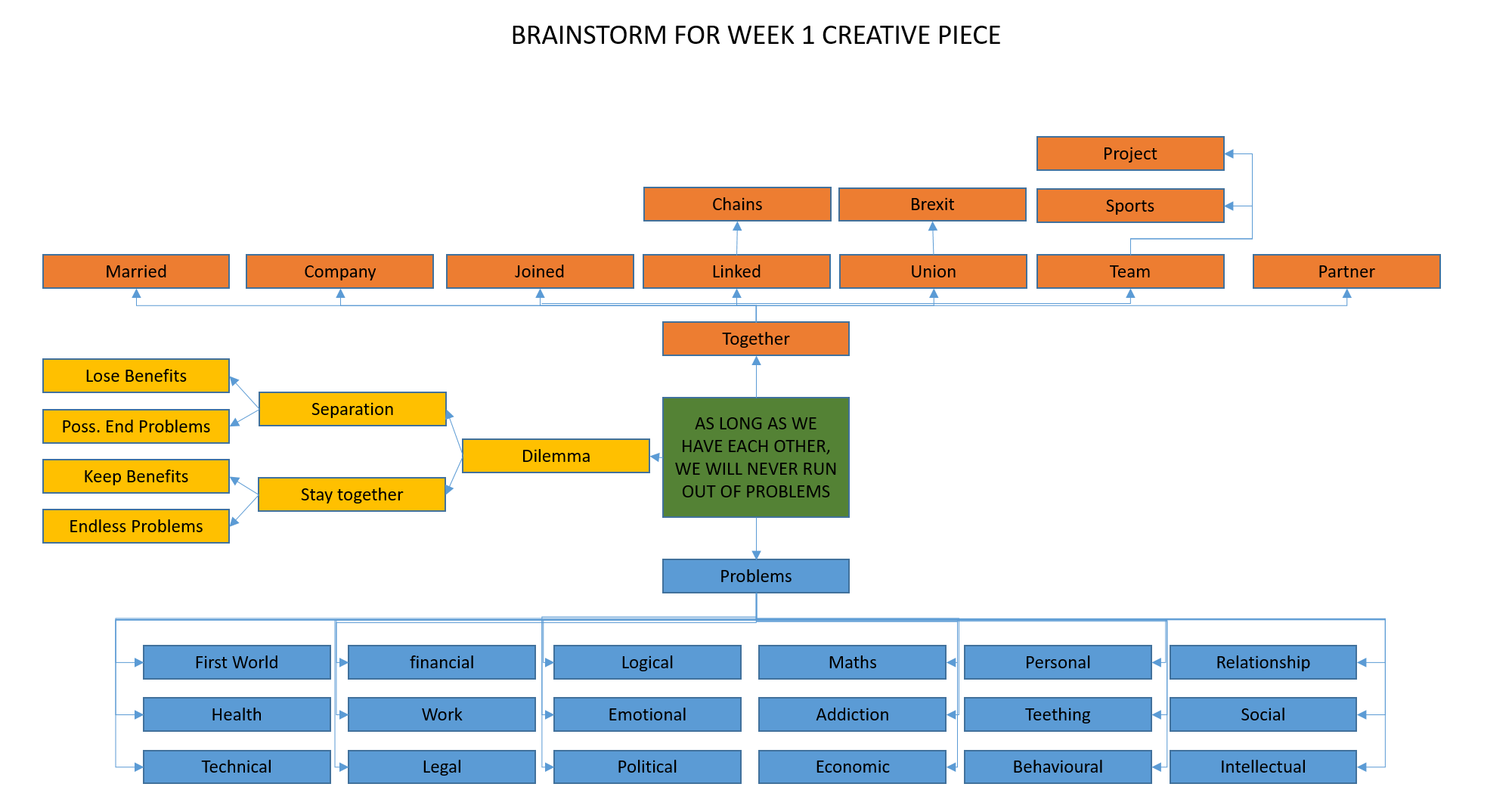
I then went on to randomly and rapidly generate unfiltered word associations for ‘together’ (represented in orange boxes, below) and types of ‘problems’ (represented in blue boxes, below) as two completely separate exercises.
Next, I carefully considered the possible links between the 2 key elements of ‘having each other’ and ‘no end of problems’ (represented in yellow boxes, below). There is a cause and effect relationship between the two, and so I deduced that a dilemma is presented, the options being:
Remain together
Through choice – the perceived benefits of remaining together outweigh the burden of dealing with the consequent persistent problems
By force – the entities are together against their will and gain very little or no benefit, while facing endless problems
Separation
To bring the problems to an end (or at least reduce them) as it is perceived to be of greater benefit to those offered by having each other
To escape the force that is keeping them together against their will and end (or at least reduce) the endless problems.
This is my 1 page
brainstorm:
I then used all of these ideas to think of situations that lend themselves to the scenario. Although the theme offers itself to a whole world of possibilities for games nicely, this is not an area that interests me as a developer and so I dismissed those thoughts immediately. Following this, the most obvious option to me was a dating app. So many people seem hell bent on finding a life partner, in spite of the inevitable problems that manifest as a result (call me cynical!). However, I wasn’t totally sold on this way forward as it’s not something that particularly interests me, and I’m aware that the market is very well, if not overly, catered for, which would make it very difficult to identify a niche that isn’t already satisfied, or present originality to the saturated market.
I also liked the idea of pursuing ‘maths problems’ and ‘logic problems’, as I like numbers and logic puzzles (simple example – Tim is twice the age of Tom, who is 6, so how old will Tim be when Tom is 8?). Coming up with a concept to fit the theme was the next challenge. During this week’s tutorial, we were urged to consider a game concept, if we are not gamers (which I’m not). This led me to thinking about how the gamification of end-of-topic testing for school children might help with their enjoyment of the subject and further their learning.
Apart from my own education, I have no experience of the school system (which I’m sure has moved on considerably since I left in 1988). Had there been a requirement to pursue this concept further, I would have spent time researching the market beforehand. But, for the purposes of the exercise, I have developed my concept based largely on my own assumptions. I did, however, confirm with a primary school Head Teacher friend that children do use tablet devices as part of their maths lessons.
Results:
I decided on the concept of “BREAKOUT!” – a database driven Android & iOS mobile/tablet app that enables the teacher to test student understanding of an area of study in a way that is far more fun and challenging for them than answering questions read out by the teacher, with a pen and paper in silence.
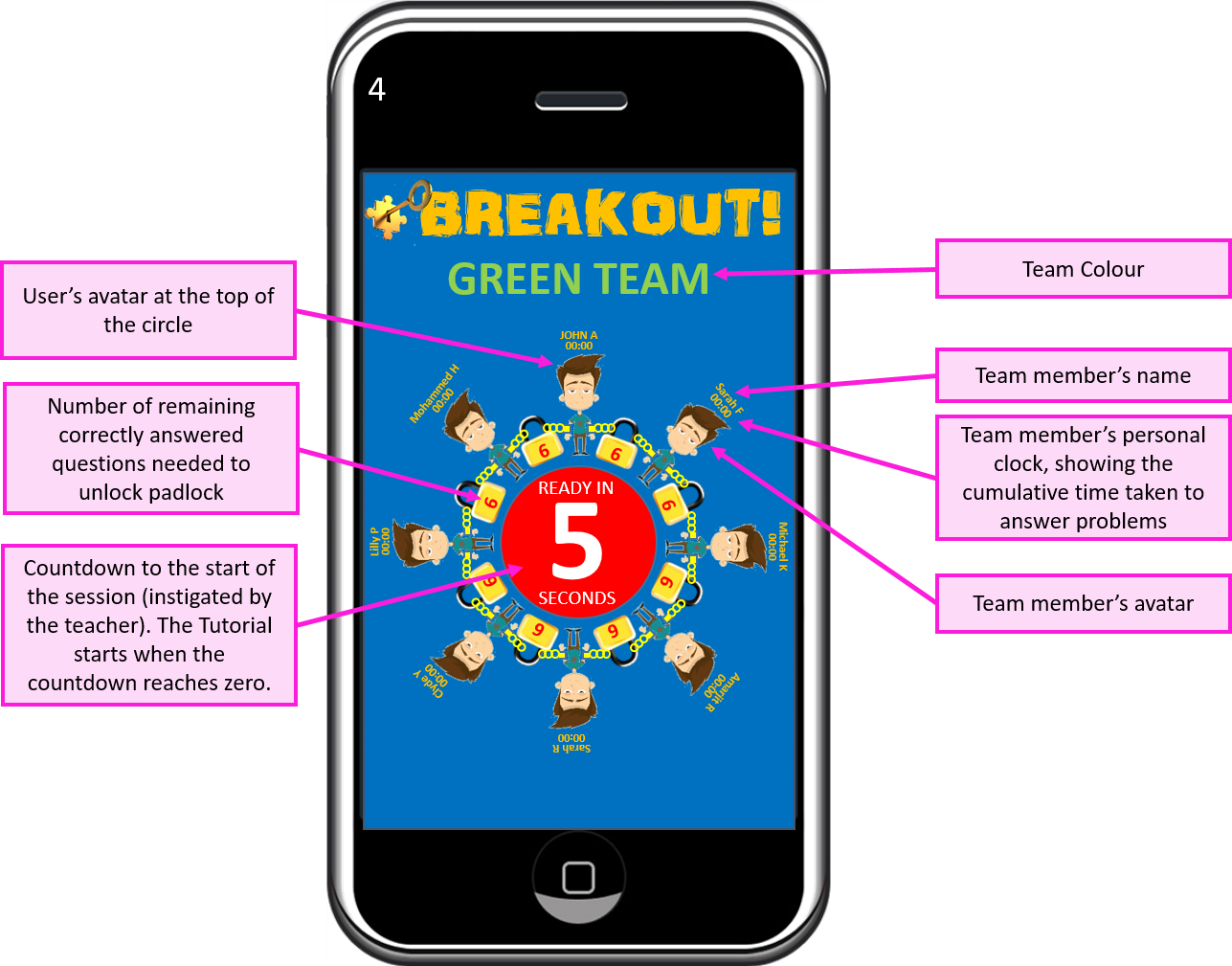
The premise of the game is that (avatars of) the students are chained together in a circle, with padlocks, each with a (teacher determined) number of locks. Whilst they are chained together, they will be presented with ‘no end of problems’. Alternate problems will reward a correct answer with a key to a lock to their left and right. Each time a student correctly solves a problem, they will unlock one of their locks. The aim of the game is for the student to free themselves from the chains, so that they no longer have each other, and put an end to the problems they face.
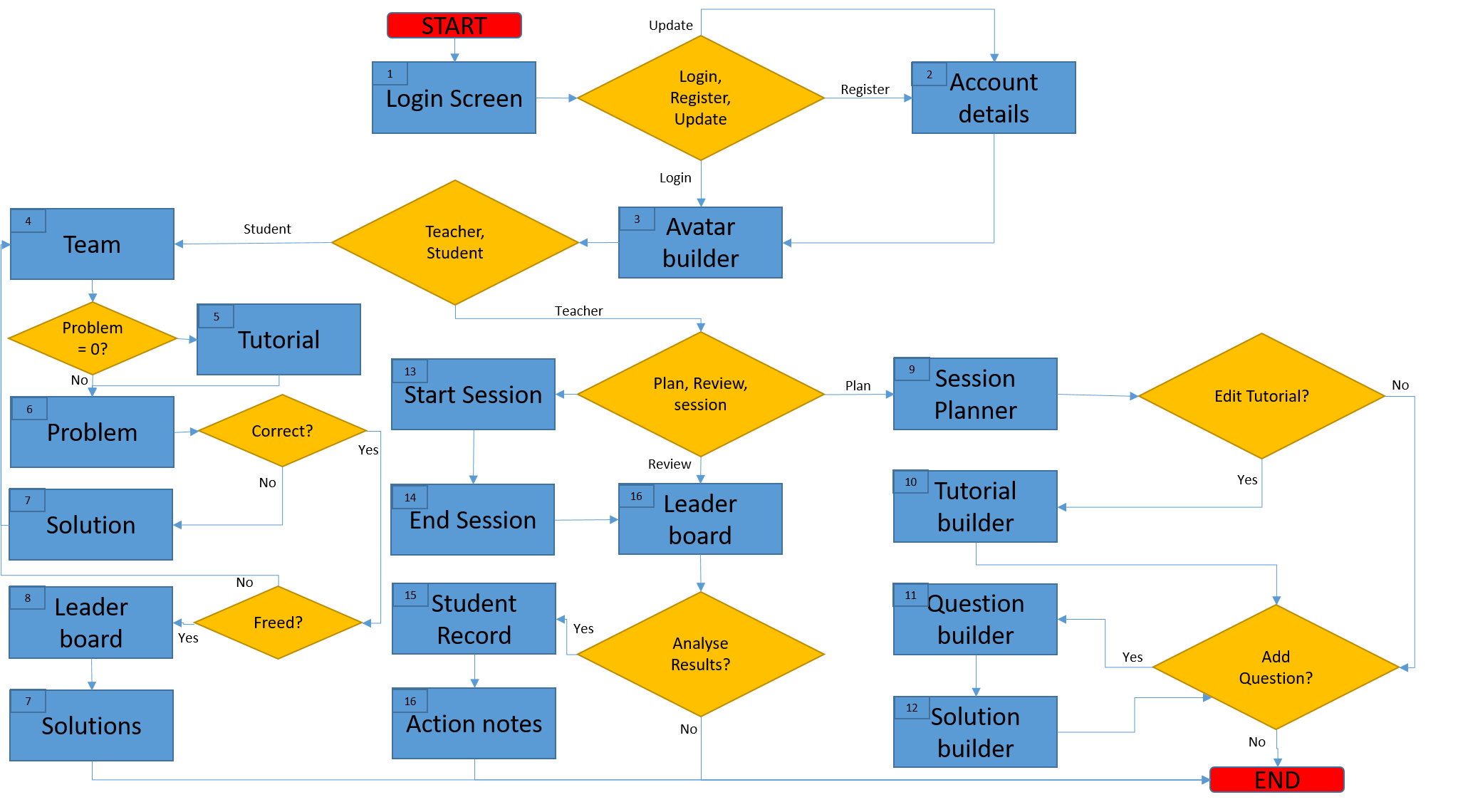
Once I felt that the concept was sufficiently developed in my head, I drew up a process flow diagram to help me to determine the screens that were needed, and how they need to interact. Numbers in the top left corner of each box (mostly) correspond with the screen numbers:
I wasn’t aiming for perfection with this process flow diagram, and I know that there are some shortcomings here, but it gave me direction and served its purpose throughout the process of designing screen content. I actually deviated from the plan on several occasions. As I moved from designing one screen to the next, my thoughts developed, and further consideration as to the practicalities of using the app inspired some alterations to the flow. I didn’t retrospectively update the process flow diagram to reflect those deviations. What you see here is my original plan.
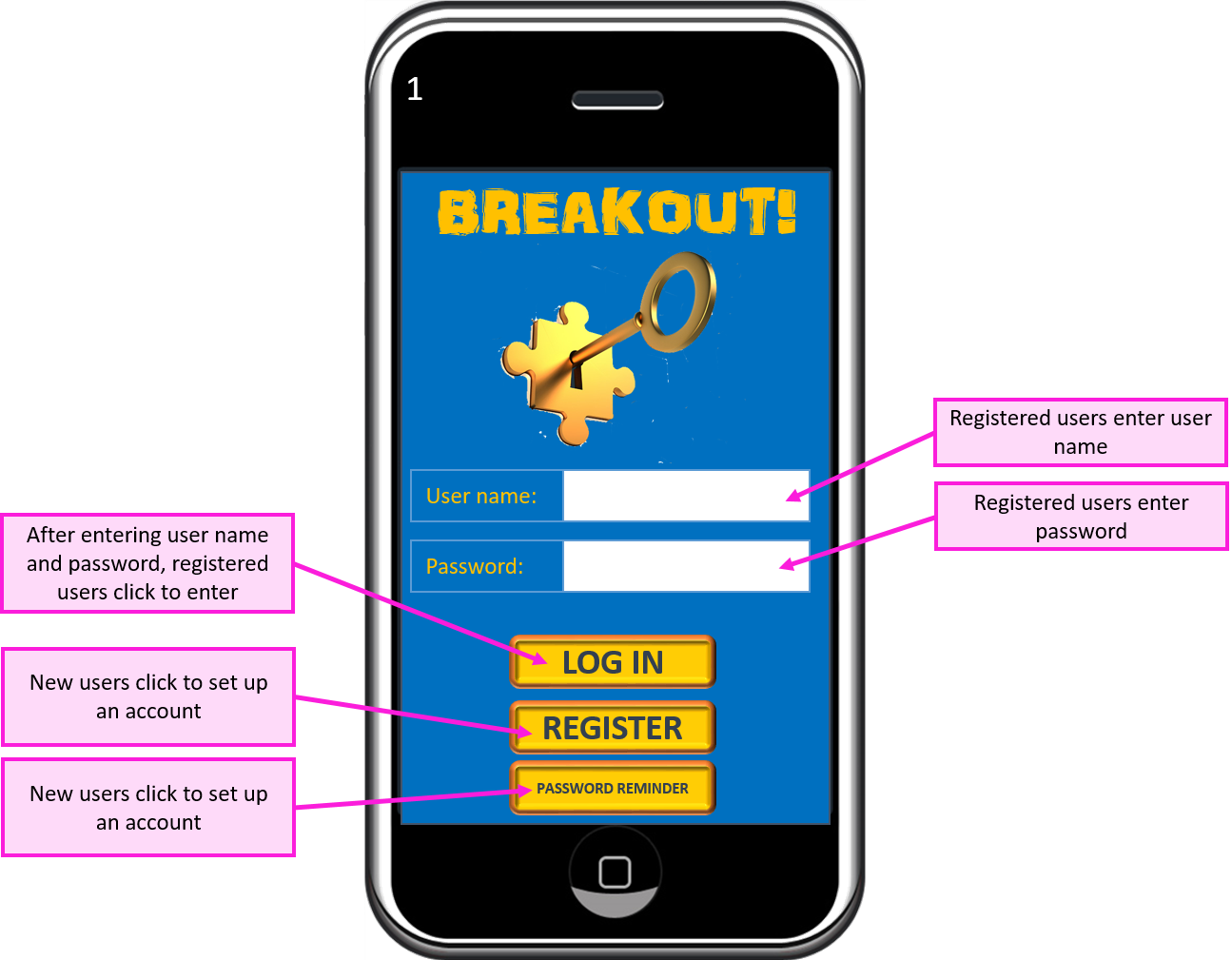
Screen 1 – Log In
The teacher will
have access to student log in details to deal with the issue of students
forgetting passwords.
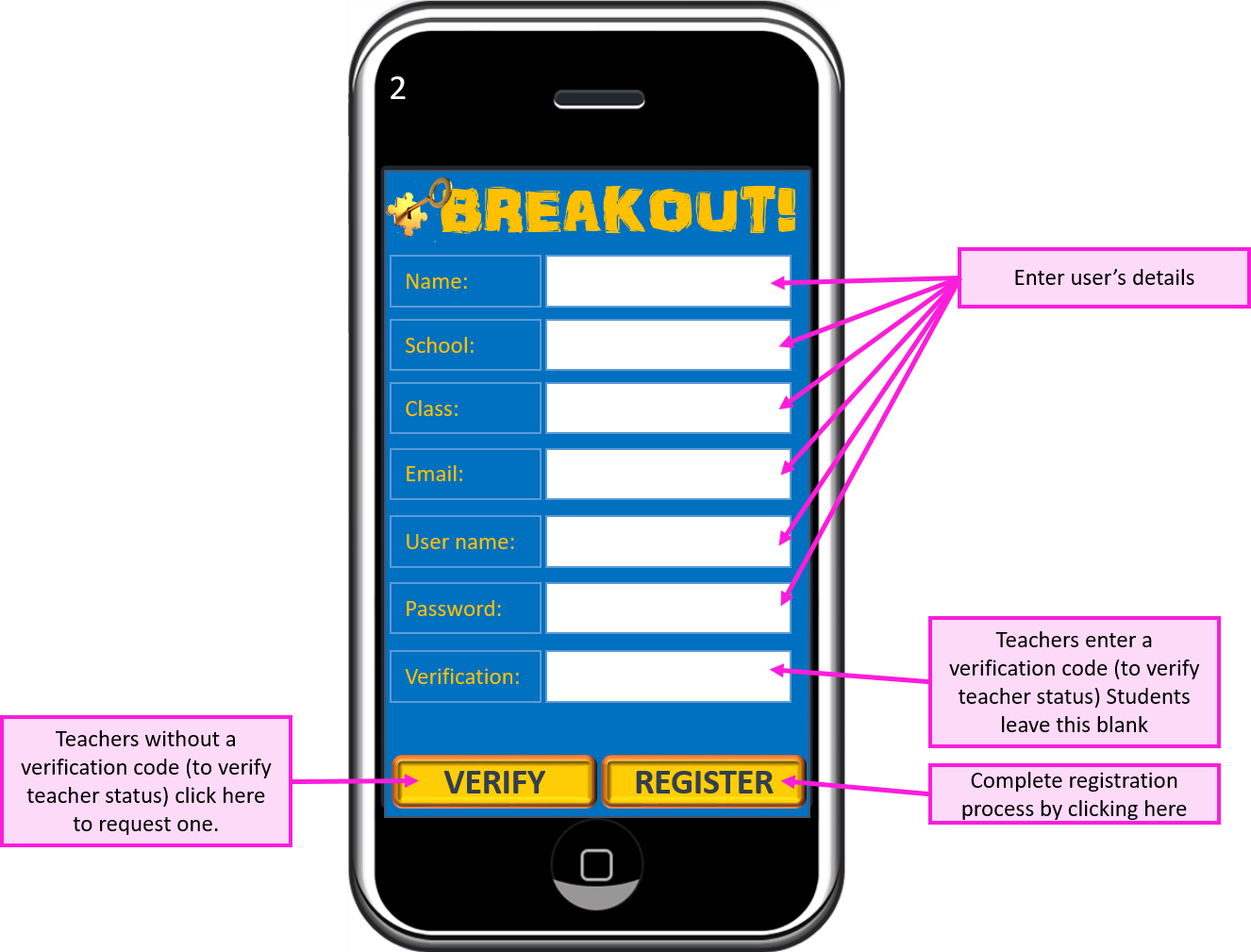
Screen 2 – Account Details
Teachers will be
issued with a verification code to enable them to set up a teacher account.
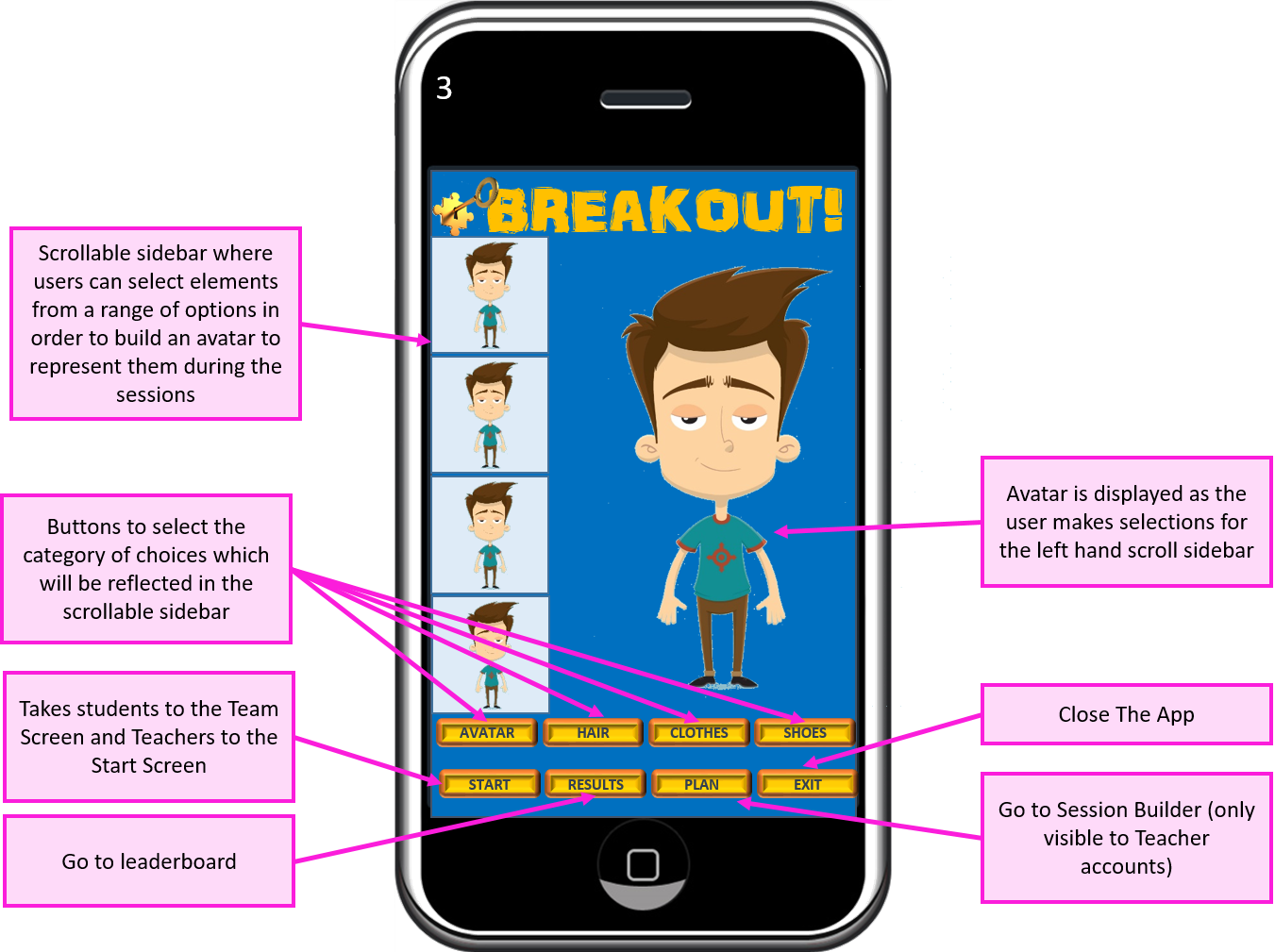
Screen 3 – Avatar Builder
Students
will be able to build and edit an avatar that represents them during the
game. A selection of boy, girl and other
(animals, aliens etc.) choices will be made available. They will be able to go on to further
customise their avatar’s hair style and colour, clothing and shoes, to inspire
fun and creativity.
Screen 4 – Team Screen
From the student
user’s perspective, the team screen acts as the home screen. They will be returned here between problems
where their progress will be updated and they can compare their status with
that of other team members.
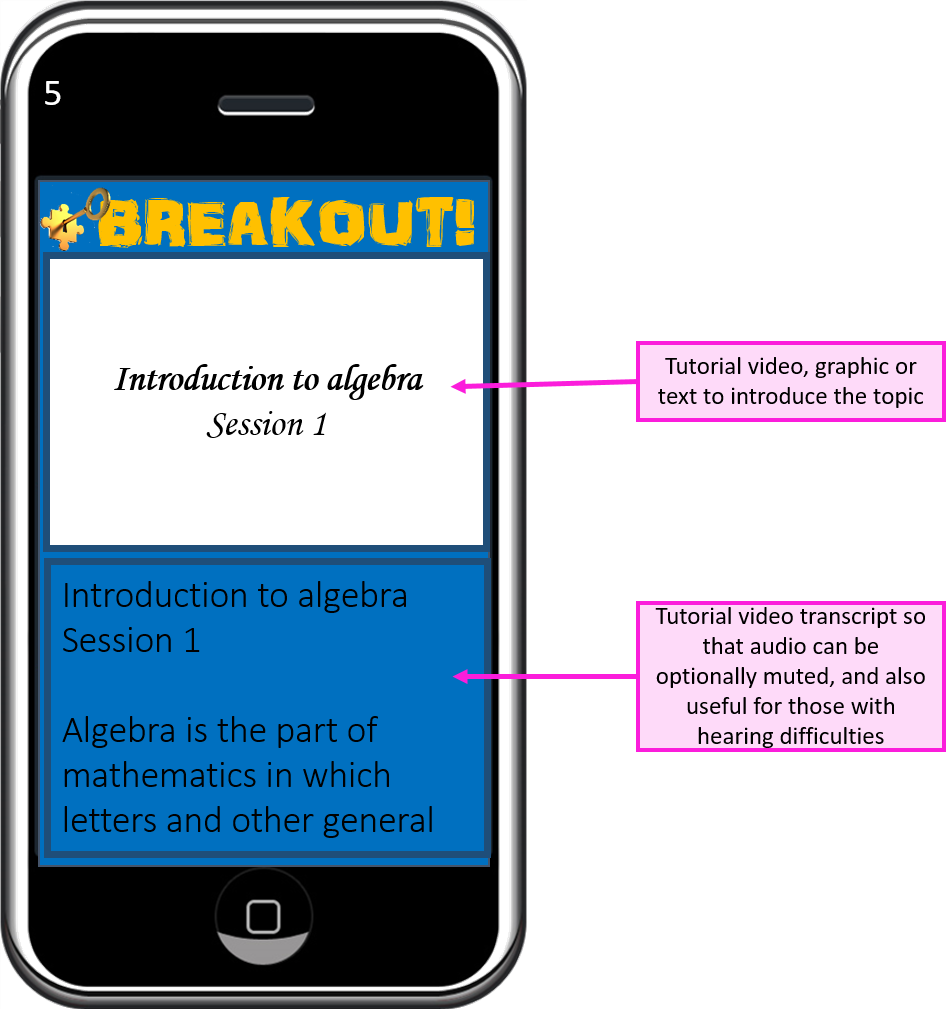
Screen 5 – Tutorial
Teacher can opt to
provide a tutorial to refresh the subject matter for the students. This can consist of a mixture of uploaded
video, graphics and text, and will be shown to the students before the first
problem is presented.
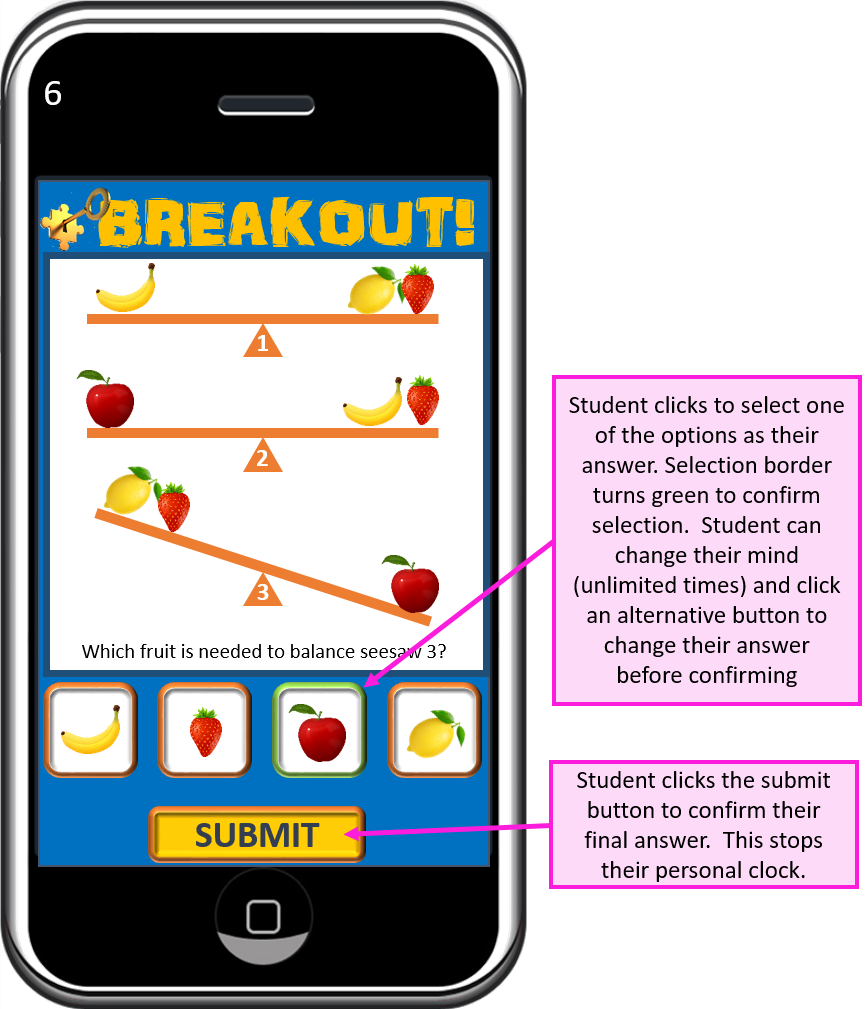
Screen 6 – Problem Screen
The student’s
stopwatch is started when the problem screen is presented, and stopped when
they submit an answer.
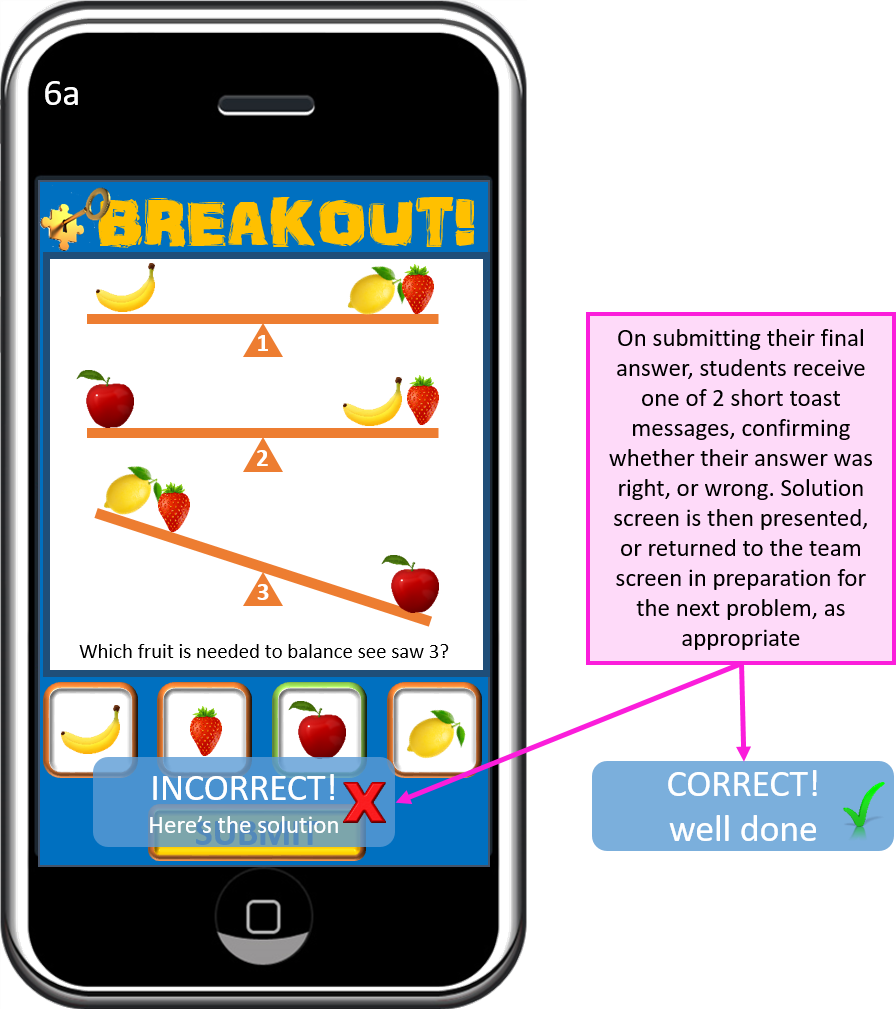
Screen 6a – Marking
The student is
informed whether their answer was correct, or not.
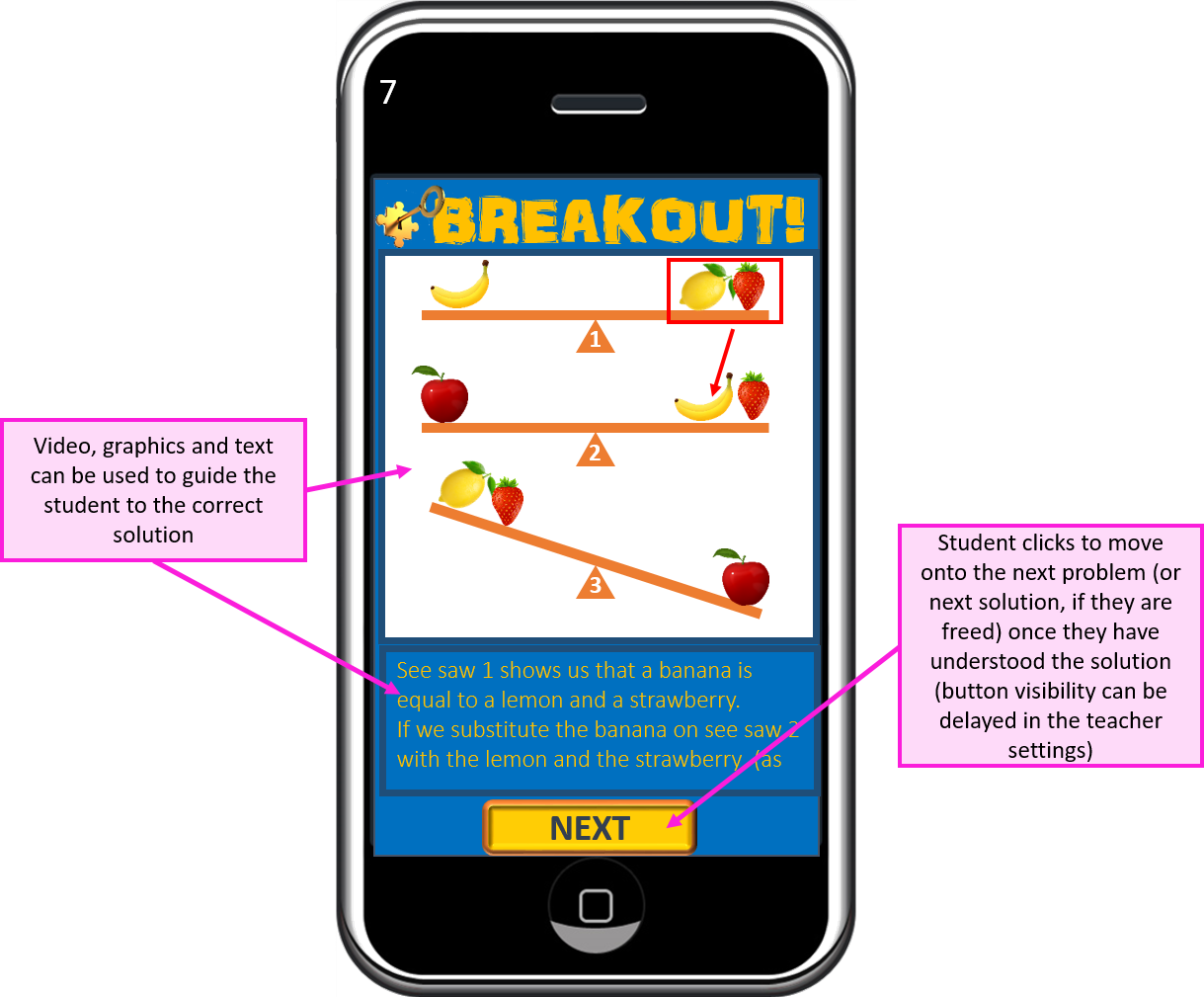
Screen 7 – Solution Screen
If the student has
answered a problem incorrectly, they will be shown the solution immediately
afterwards. The time taken with the
solution will act as a penalty and be added to their score. The teacher has some control over the
magnitude of the penalty when setting the question.
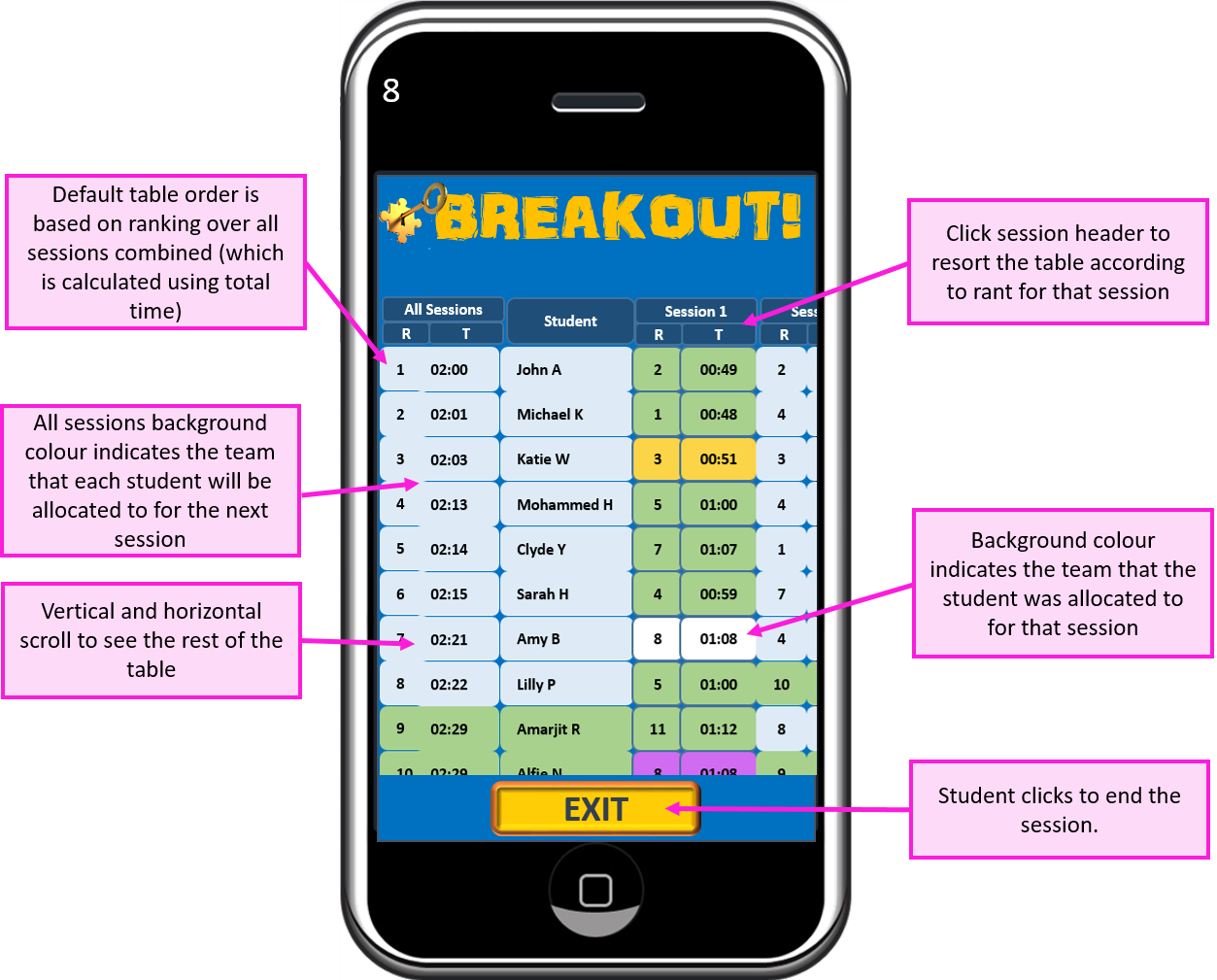
Screen 8 – Leader Board
Students can see how they performed in comparison with other students in their team, and in their class, for each session, and cumulatively over all sessions to date.
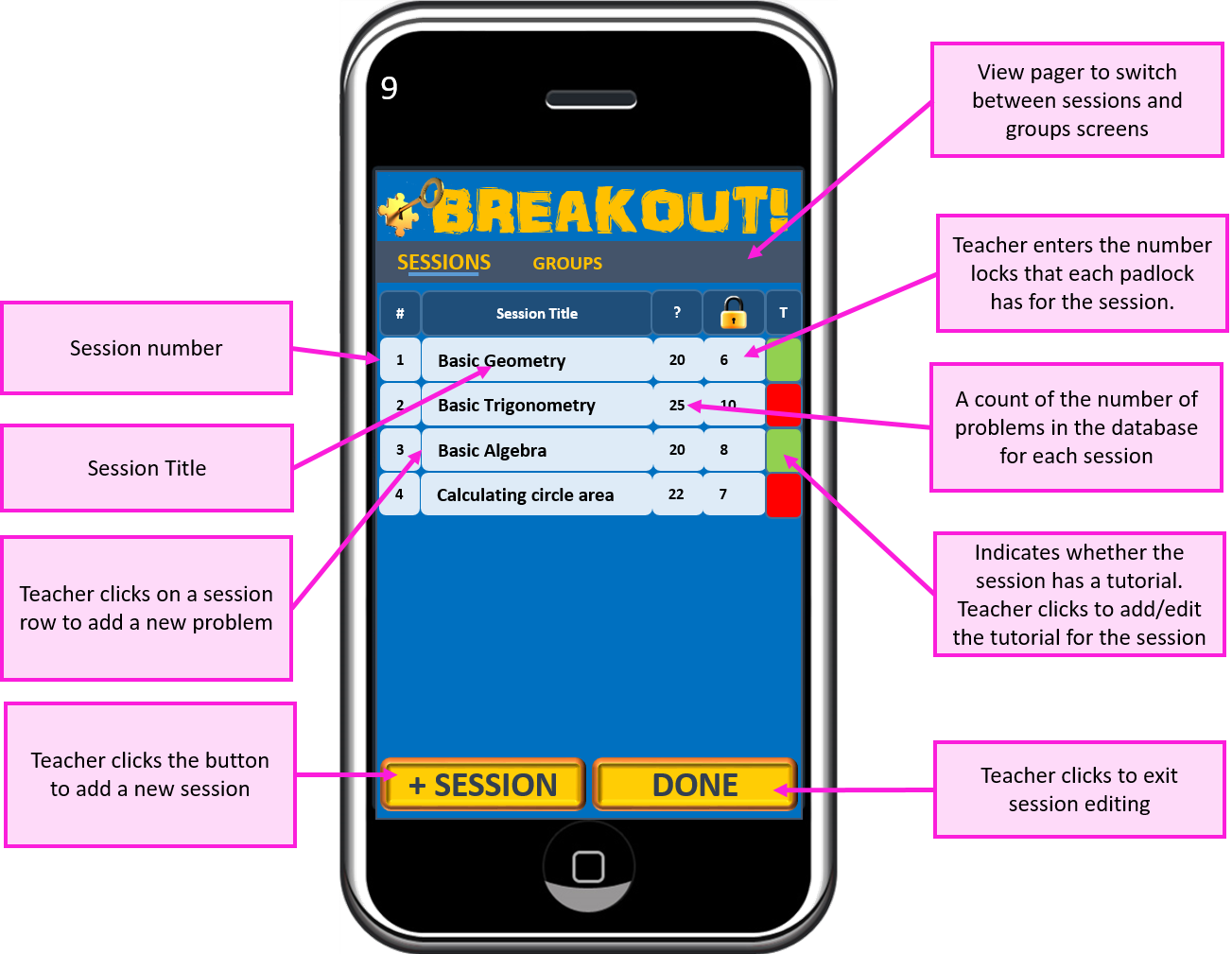
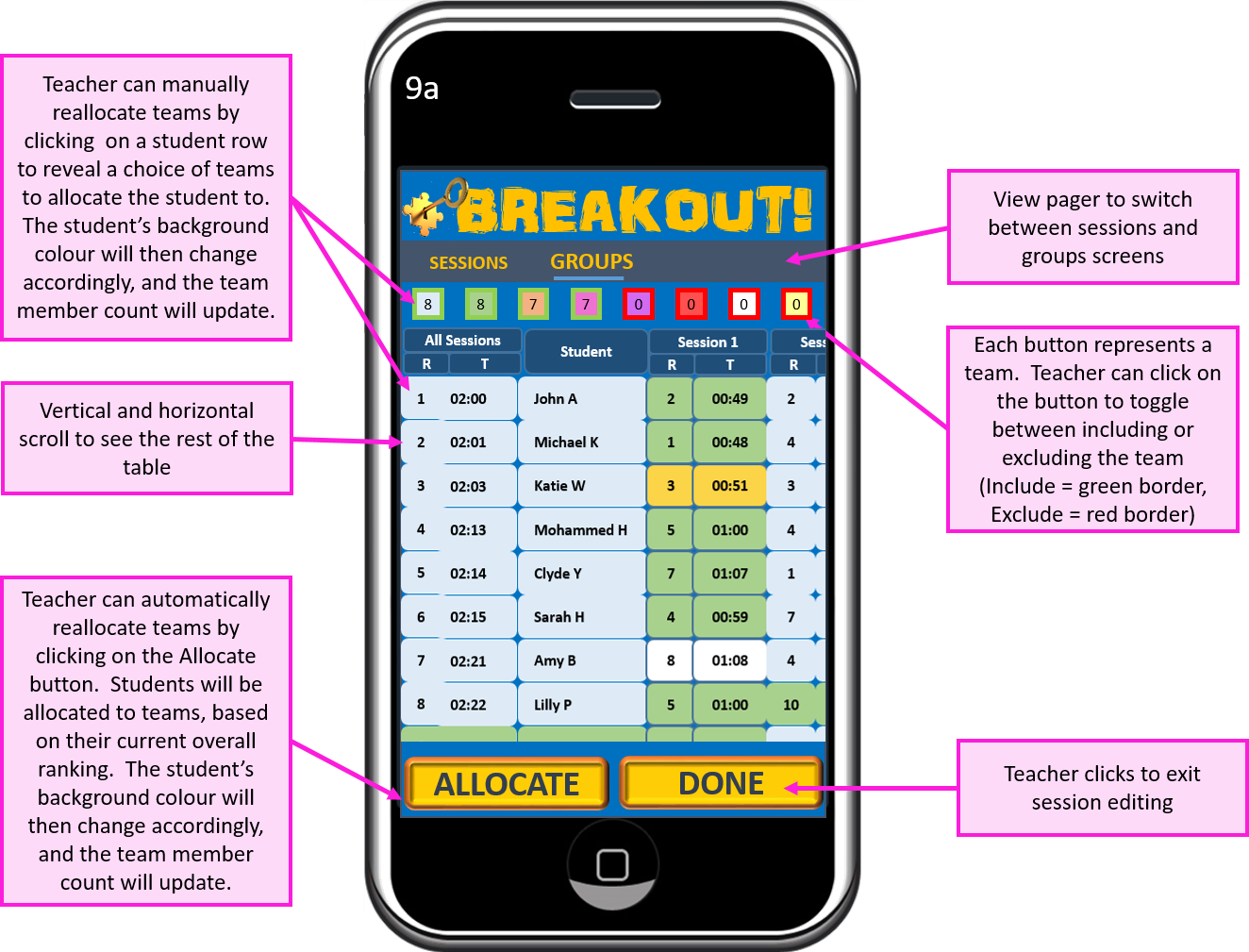
Screen 9 – Session Builder
The teacher can build sessions to cover each of the topics on the syllabus.
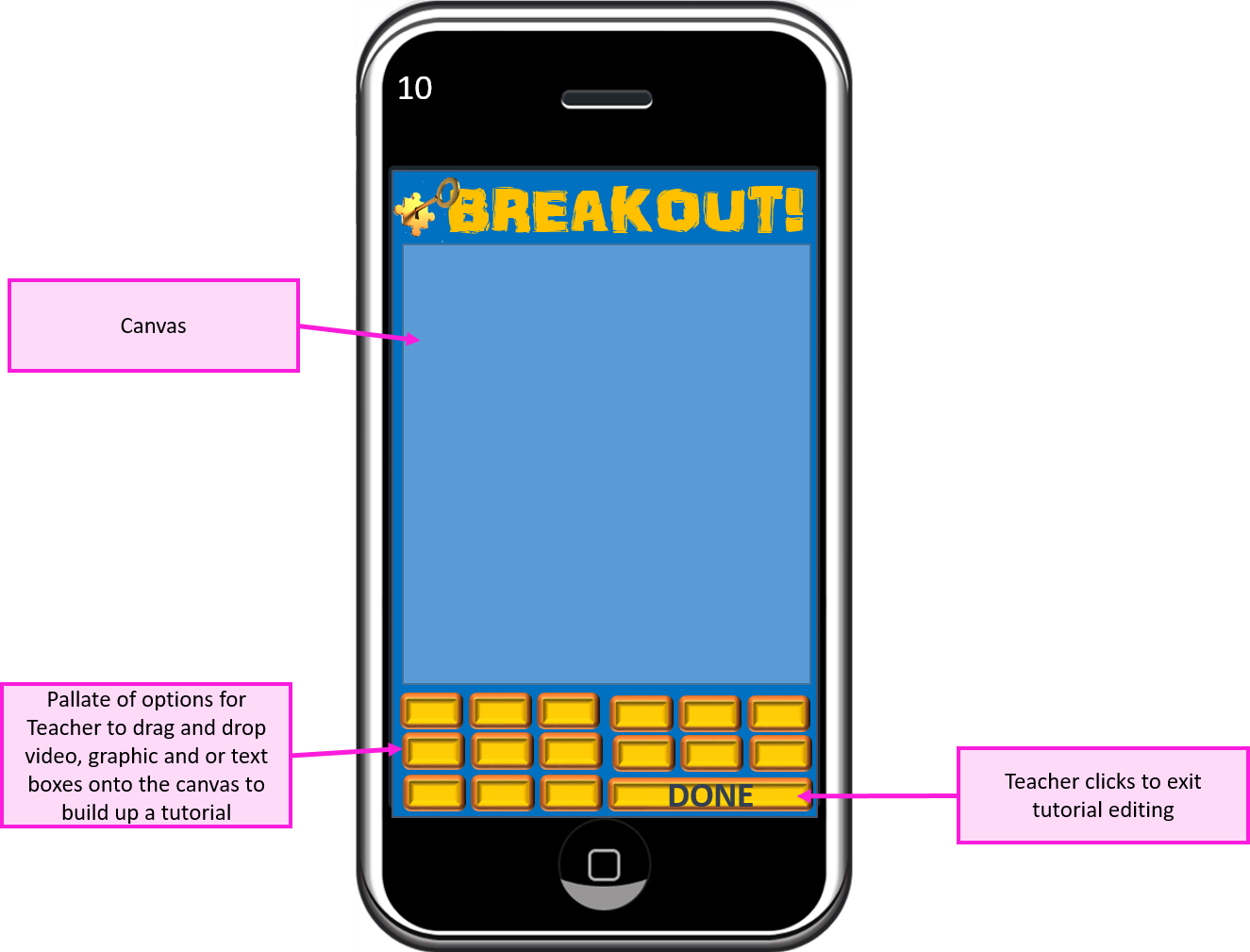
Screen 10 – Tutorial builder
This is where the teacher builds the (optional) tutorial that acts as a brief refresher for students before starting the first problem of the game. I have not gone into too much detail here as far as the controls are concerned, but I anticipate a drag and drop capability, with uploaded video and graphics files.
Screen 9a – Problem Builder
The system automatically reports the leader board after each session is complete, and allocates the students to groups according to their overall ranking and an optimised number of groups. The teacher is able to override these allocations if they feel that students could benefit from being in another group.
Screen 11 – Problem List
The teacher is able
to see the full list of problems in the database relating to the session, add
new problems, or edit existing ones.
The teacher needs
to build up a number of problems (all at a similar level of difficulty and
complexity) well beyond the number of locks set on 2 padlocks. This will allow for incorrect answers. Students will be presented with problems in a
random order, so that they are unable to collaborate.
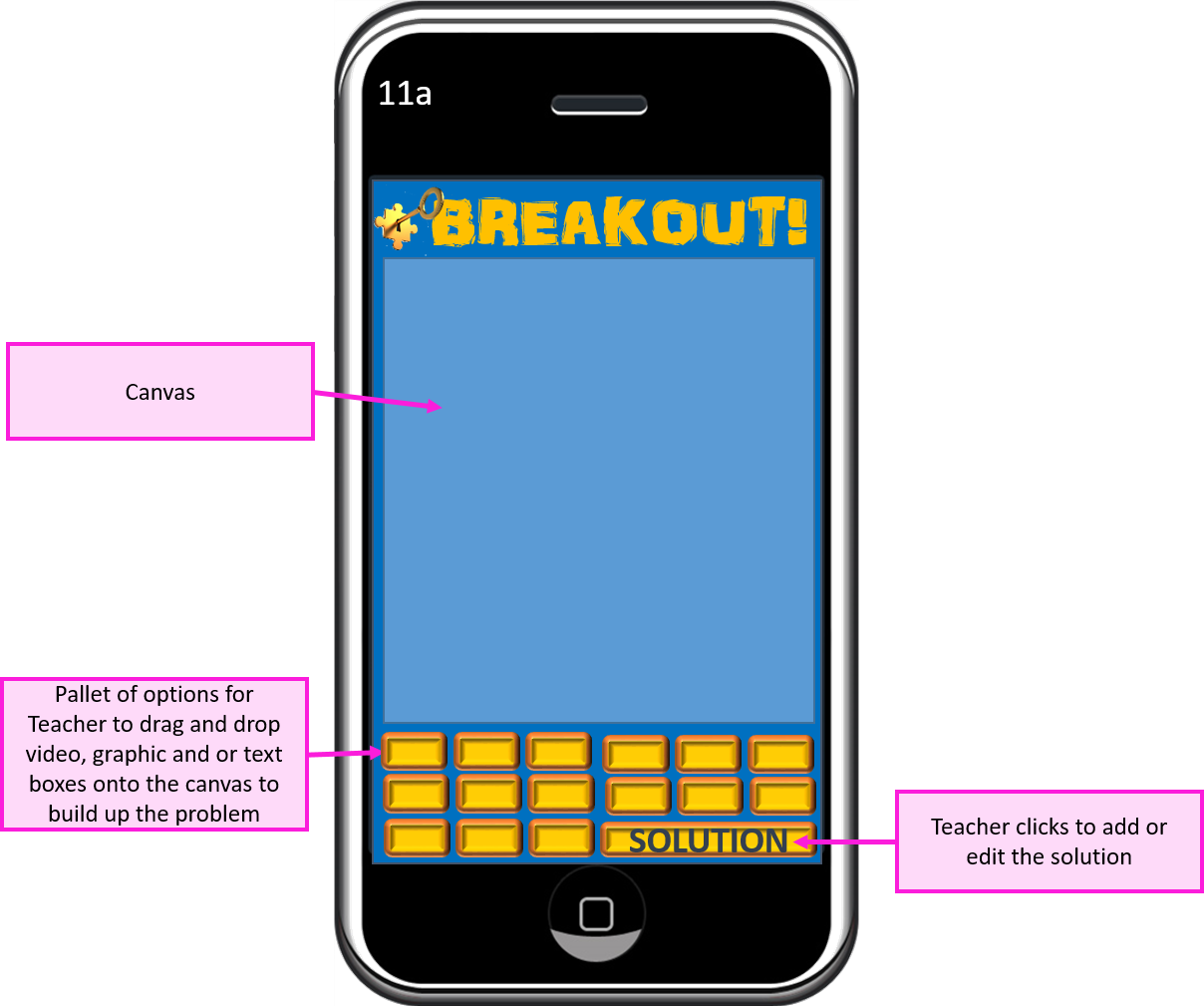
11a – Problem Builder
This
is where the teacher builds the problem screen.
I have not gone into too much detail, as far as the controls are
concerned, but I anticipate a drag and drop capability, with uploaded video and
graphics files
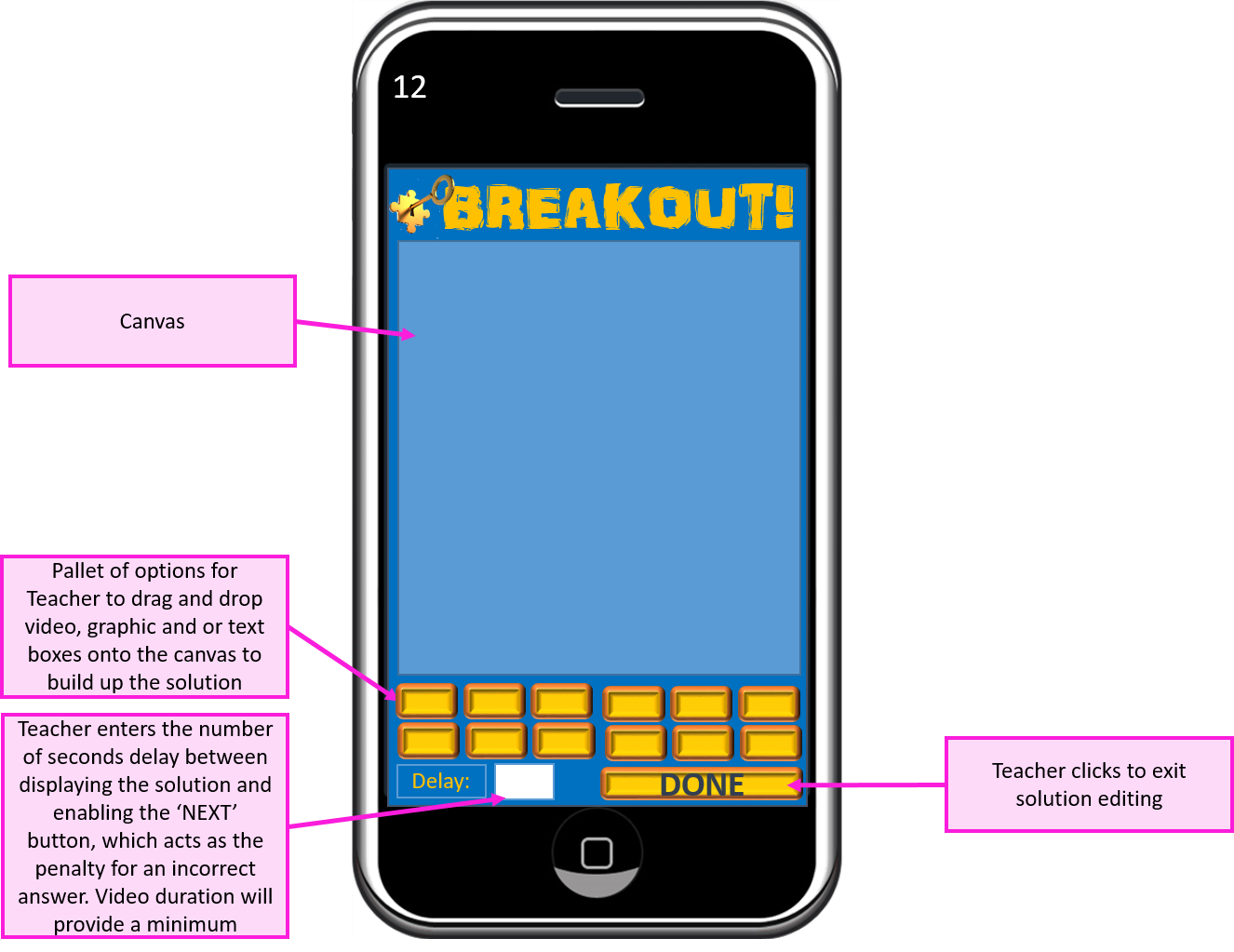
12 – Solution Builder
This
is where the teacher builds the solution screen. I have not gone into too much detail, as far
as the controls are concerned, but I anticipate a drag and drop capability,
with uploaded video and graphics files
13 – Start Session
This is the teacher’s control panel for running a game session. The teacher can see when all the students are ready to commence (and which students aren’t), start the session, and see when students (and full teams) are freed
14 – Teacher Leader Board
This is where the teacher
can analyse results of the session and the overall leader board standings. From here, the teacher can drill down to
analyse the performance of each student.
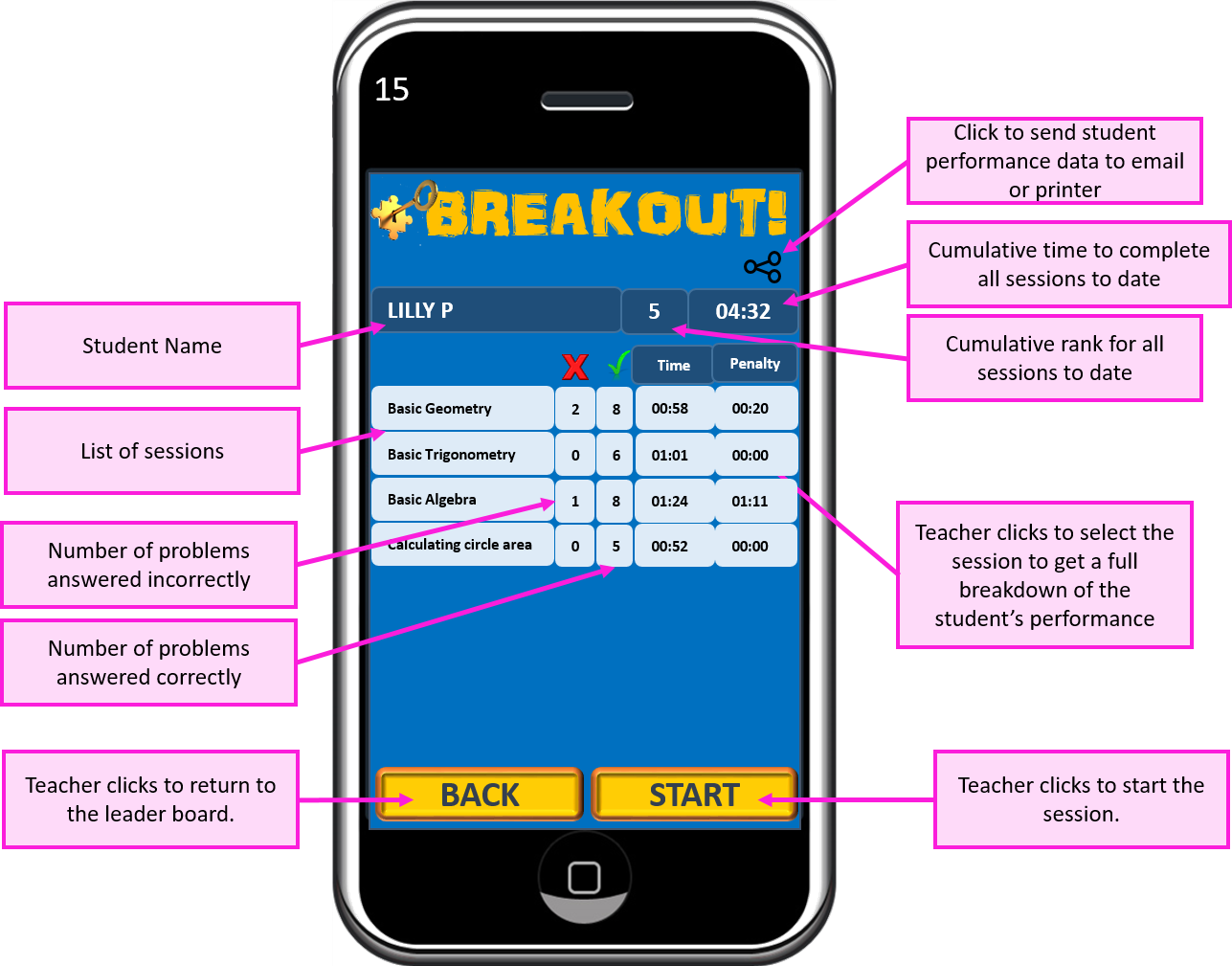
15 – Student Record
This screen shows the student’s overall performance at a session level. The teacher can then click a session row within the table to view the student’s performance for each question within that session.
15a – Detailed Student Record
The teacher can get an insight into how the student performed within each problem that they were presented with.
Credits (in line with graphic usage licence requirements):
Animation could improve the user experience, particularly where younger children are concerned.
The analytical tools could be enhanced to provide more useful reports for teachers, containing charts to aid performance comparison and progress monitoring.
Different games could be added in order to provide some variation for the students.
If I were to pursue this concept any further, I would invest significant time in market research and concept testing before taking it any further. I did do a search for ‘algebra’ on Google Play, which indicated that there might be a gap in the market for the concept. However, to minimise startup risk and maximise the potential for this concept to become a successful product, Among other things, I would need to know a lot more about:
how subject testing is performed in schools now (and the pros and cons of these methods)
what teachers and students (perhaps further segmented by age) want from a new product
what competitive offerings are currently available (I have since been informed of the existence of kahoot.com, which appears to have similarities with my concept)
Education Board approval process
A centralised database (Firebase, for example) would enable results and progress to be compared against other classes and even other schools or countries, providing far greater opportunity for analysis.
The app could be monetized with a structured subscription model. Market research would be required in order to get this right). A payments screen will need to be added.
Teachers could buy and sell the tutorials, individual problems (with solutions) and even entire sessions that they have built. This could be done with subscription credits, or money.
Using Google Analytics would provide useful user data that would contribute to the future evolution of the app.
The concept of the game could be used for testing in subjects other than maths.
The concept lends itself well to a platform situation, where a community of teachers interact to generate value for that community, with network effects providing feedback that will positively impact the product lifecycle.
What went well:
Overall, I was happy with my thought process and how it helped in achieving the results that it did.
I feel that I have achieved a fairly robust first draft concept that fulfils the requirements of the brief and has plenty of scope for further development.
With market research driven refinement, I believe that this concept could possibly have the potential to be moulded into a marketable product.
Lessons learned:
I spent far too long on this exercise. While the ideation phase was completed fairly swiftly, I have probably gone into far too much detail for concept testing purposes.
Building screen mock ups was a very long process. I might have gone into too much detail for each screen, but it is largely down to my choice to use Powerpoint. As I have no manual drawing ability whatsoever, Powerpoint seemed to be a good idea at the time, as I am quite familiar with it and I thought I would save some time over learning a new program for the task.
While Powerpoint is an adequate (if not the best) tool for brainstorming exercises, it is definitely not the best tool for process flow diagramming or for designing screen mock ups, as it is far too fiddly, slow and can get quite messy (particularly where process flow diagrams are concerned). I will spend some time searching out and testing more appropriate tools for these jobs next week.
This is my first experience with blogging. I’ve opted to use WordPress, as I’m aware of its popularity among bloggers and it’s free to use at the most basic level of subscription. With no prior experience of WordPress, I’ve followed the setup wizards (and, to some extent, my intuition) and managed to establish a first attempt blog site, which should serve its purpose.
I do need to find some tutorial resources and develop my WordPress capabilities, but I think I’ve achieved an acceptable starting point from which the look and feel of my blog can, and will, evolve over the duration of the course.
Browsing a number of blogs created by students further along on the MACAD course, I see considerable variation of style and presentation. I’ll continue to do this in order to get a feel for the elements that I particularly like, and those that I don’t. This will be very useful in shaping my own site, over time, into one that best serves me.
The start of my 2 year journey through the MA Creative App Development (MACAD) online distance learning course with Falmouth University.
If I start off with a few biographical highlights, it might help to give you a bit of context:
I graduated from Thames Valley University with a BA(Hons) in Accountancy in 1993, and spent the next 3 years working in marketing with The NatWest Group, in London. I also achieved The Chartered Institute of Marketing Diploma in 1995. I was fortunate enough to receive a redundancy payout. I spent some of it on a backpack and set off on a round-the-world ticket for 18 months. I settled in Brisbane, Australia for a year of that time. Initially, the closest I came to finding a “marketing job” was handing out flyers for an earlybird parking scheme, dressed in a chicken costume – which I politely declined (true story!) . Instead, I strategically re-worked the emphasis on my CV and quickly found work as a Management Accountant for a Telecoms company. I then spent a few years back in London doing contract work, which was mainly Microsoft Excel based management accounting, reporting and analytical projects. I taught myself VBA (Visual Basic for Applications) for Excel in that time. Then the opportunity arose for me to move back to my home city of Plymouth in 1999, and I became The Commercial Manager for The Plymouth & South West Co-operative Society. 3 years later, I set up as an independent consultant, providing Excel/VBA services (financial/business modelling and bespoke automated reporting systems ) to public and private organisations ranging from startups to multinationals and British Government Agencies. I covered a broad range of industries, including Retail and Defence.
For various reasons, it’s now time for a bit of a career change for me. I have been working on a plan to start a new business venture, and an app is the central asset. I have identified some personal development needs that need addressing before I can properly get going with it, and so I am embarking upon this course in order to fill many of the gaps.
Having been through the “Android Basics” and “Advanced Android App Development” Nanodegree programs from Udacity (on Google backed scholarships), I’m bringing a modicum of technical experience to this MA in Creative App Development, but I don’t feel that I have yet achieved any significant level of technical confidence or competence as yet. I fully intend to change that.
It’s been a long process just getting to this point. From initially being made aware of the course, and right up to the point of an in-depth video chat with course co-ordinator, Al Parker, I was in two minds as to whether this course was the right path for me. Having gone through the course content in some detail with Al, I could see that the course offers a great opportunity for me to gain a much broader understanding of the wider spectrum of possibilities for developing apps, as well as affording the flexibility for me to focus on the areas that are directly relevant to my ultimate goals.
They say that youth is wasted on the young. On reflection, I really didn’t make the most of the academic opportunity that my first degree offered – I just did what I needed to do to get through, and very narrowly missed out on a 2:1 (with hindsight, I really should have appealed – a bit too late now!). But anyway, it’s a lesson learned, and this time it’s a bit different – I’m older, wiser and and have long term objectives to drive me and so I fully intend to throw everything I have into achieving as much as I possibly can over the next 2 years. I have finished my consultancy business so that I can make the course my primary focus and I will be working on it full-time. I’m sure this MA will present me with a rollercoaster ride of challenges and achievement, but I’m strapped in and ready to go…











 My Journey to App Success