I need to cut my list of possibilities down to just 2 to move forward with. I was expecting to have to spend some time deliberating this, but I arrived at my conclusion after asking just 2 questions:
1. Would I use it?
It’s so much easier to develop an app concept for which you consider yourself to fit the profile of the target market. Therefore, it was easy for me to eliminate the trades person’s work management tool and the children’s treasure hunt concepts.
2. Do I know enough about the subject area?
As time is a limiting factor here, it is wise to discard any concept that would require extensive research in order to generate authentic and meaningful content. I eliminated the habit breaker concept on this grounds. Although it is something that I think I might really enjoy bringing to life, I don’t know nearly enough about Neural Linguistic Programming, Cognitive Behavioural Therapy, or any of the necessary psychological techniques required to effectively make a difference. Extensive research time and collaboration with experts in the field would be essential and these are resources that I just don’t have at my disposal.
So that leaves me with two concepts to delve a little deeper into, to explore the possibilities:
The point of this stage is to analyse the result of the brainstorm, compare and contrast the lists that were generated, and start to consider the patterns, concepts and themes that emerge from that.
The Result
I took the full 20 minutes to came up with a list of general themes that could potentially lend themselves to solid app concepts, and satisfy the requirements of the jam theme. It then only took me a further 22.5 minutes to put a little flesh on the bones for each of the the top 5 themes to turn them into high level concepts (in no particular order):
A treasure hunt style game for children, to guide them around an attraction or location e.g. a zoo or maybe a city centre, imposing restrictions, such as road blocks, along the way, They could be collecting tokens as they go, which generates a score, dictating their position on a leader board, where they can see how they performed, relative to their opponents (all other users).
A cookery competition where opponents are guided by a recipe, with ingredient and time restrictions, with the video/ photo results uploaded to compete for likes.
A habit breaker, that guides the user from their nemesis (opponent) ingrained habit, to freedom from the restricted lifestyle that the habit causes.
A mentoring platform that matches those seeking guidance through a project, due to their restricted experience and/or ability. The user will then compete against opponent mentees to be selected by the mentor.
A CRM and work management tool for independent tradespeople, guiding them through an efficient process from initial customer contact, through quoting, invoicing and building an ongoing relationship with the customer. Many Independent tradespeople are restricted by time and know how when it comes to administration and establishing an effective process. Using this app will help them to win jobs over opponent tradespeople.
I have managed to bank almost an hour of allotted time for this stage. The ideas flowed faster than I had expected them to, but, I do put some of this gain down to an overestimation of the time required to achieve this.
I now need to apply some evaluation criteria to whittle this list down to just 2 contenders…
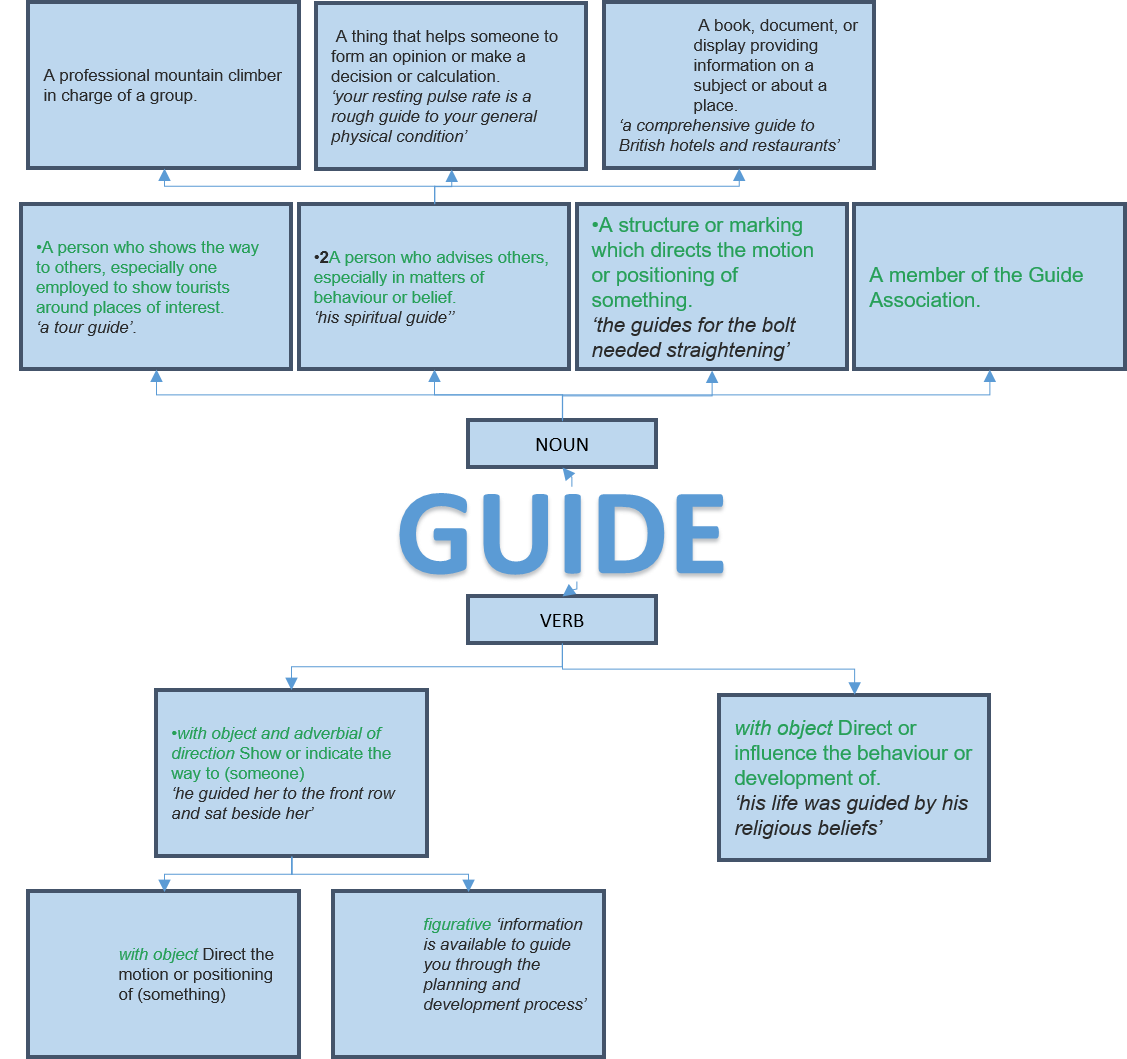
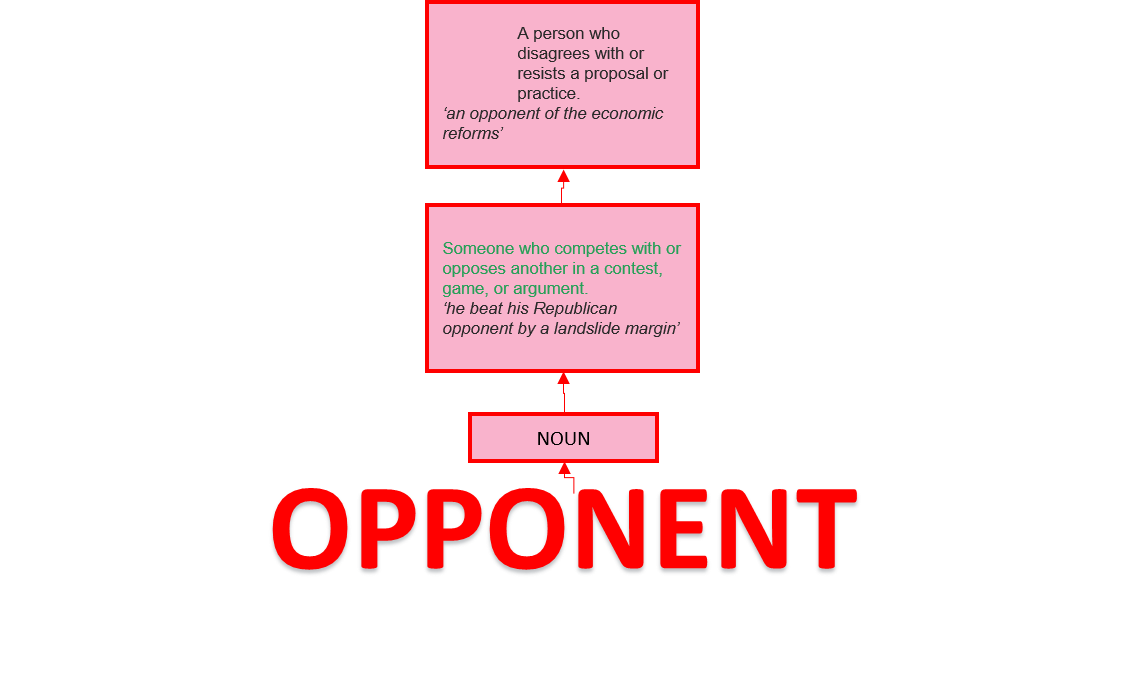
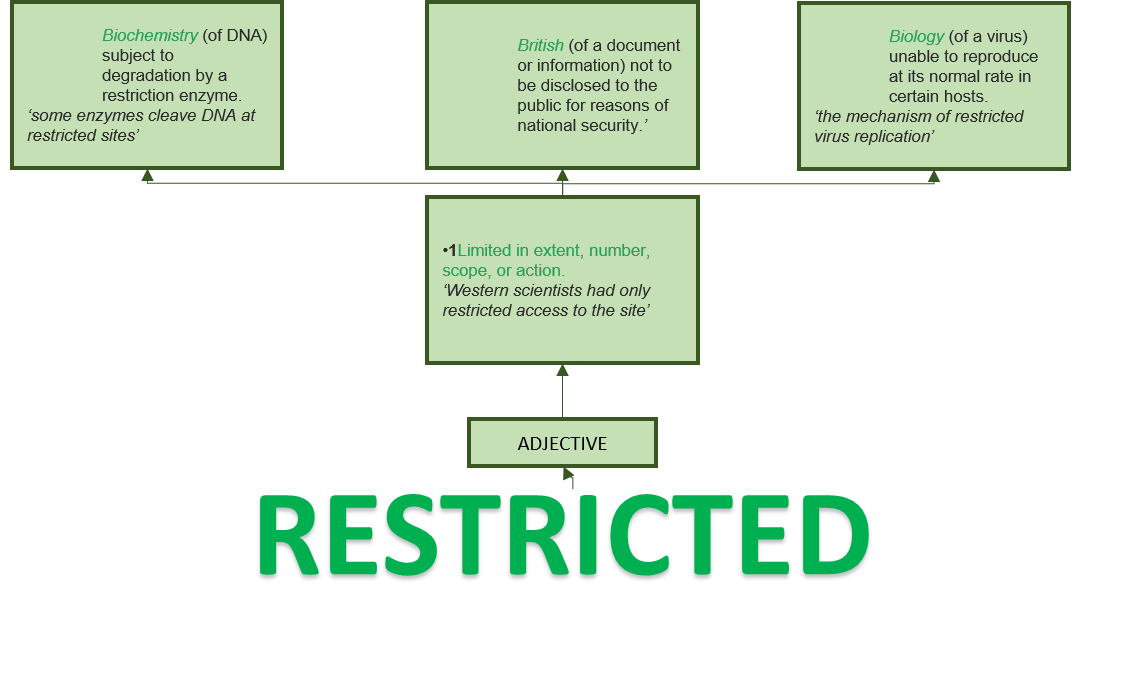
The purpose of this stage is to build upon the dictionary definitions of “GUIDE”, “OPPONENT” and “RESTRICTED” in a free flowing, unfiltered brain dump of word associations, synonyms, antonyms and anything else that might come to mind.
For the sake of clawing back the time lost during the dictionary definitions stage, I restricted my time on each of the words, and used good old pen and paper as my tools for the job, rather than employing digital methods. The benefit being that it is far quicker to scribble down the ideas as they come into your head, but this comes with the cost of presentation. In reality, this is not a problem as the true purpose is to generate ideas for yourself,. however, in this instance, the outcome will be shared in this blog post, so all I can do is apologise to the reader for my very untidy handwriting, which you will probably find illegible. I can read it, and that’s all that really matters.
The Result
I found that once I got started, the ideas flowed fairly quickly and effortlessly, up to a point, and then a more conscious thought process engaged as the speed of idea generation reduced. 15 minutes was adequate time for each of these words and so I called a halt early, which creates 5.5 minutes of extra time for the rest of my plan, which I’m sure I will be thankful for at some point.
So the first step was to get a definition for each word from the Oxford English Dictionary online, and to then break each one down into appropriate chunks . The purpose of this is to provide a foundation for the creative process of exploring the possibilities that the theme affords. I used Powerpoint to do this as it is easy to rearrange the chunks as necessary.
The result:
Right off the bat, I’ve experienced slippage on the first task. This is down to a combination of factors:
The original estimate of time required for this task was a little on the optimistic side.
Breaking the definitions down into boxes in Powerpoint was a little more fiddly than I had anticipated.
I had watched the theme revelation video before tackling this stage, but I hadn’t noticed the attached papers that explained the use of VNA (Verb, Non, Adjective) cards. I have since read them (but not until after I had completed the Associations and Links stage) and I now realise that “GUIDE” must be used as a verb, and so I might have wasted some time arranging and considering the definitions and examples of “Guide” used as a noun. I could have saved some, if not all of the excess time by ignoring them. Looking at it from a different angle though, a guide, is used to guide. The two are practically interchangeable, and so, it could be argued that exploring “GUIDE” as a noun was time well spent.
I will compensate for this slippage, and bring the critical path back into line, by restricting my Brainstorm stage to 16 minutes and 50 seconds per word, instead of the planned 20 minutes, making up the 9.5 minutes overshot on this phase. To help with this, I will abandon any digital tools in favour of a fast and furious pen and paper brainstorming session.
We have been tasked
with presenting a concept for an app that will create value and enrich
communities. The primary purpose of this
task is to experience the process of rapid ideation – an exercise to help
nurture creativity. The app concept must
also comply with the constraining theme provided:
“AS LONG AS WE HAVE EACH OTHER, WE WILL NEVER RUN OUT OF PROBLEMS“
My thought process:
I allowed the theme to stew in the back of my mind for a few days before actually doing anything with it. Although the theme is intended to provide a constraint, it is wide open to interpretation, with a plethora of choice of avenues to pursue. I found myself identifying numerous divergent paths relating to the theme without conscious effort over those few days. Then came the time to brainstorm. I firstly identified the 2 key elements of the theme:
1. Having each other:
The first synonym that came to
mind was ‘together’. I then looked for
the Oxford English Dictionary definition of together:
ADVERB
With or in proximity to another person or people.
‘together they climbed the dark stairs’
they stood together in the kitchen’
So as to touch or combine.
So as to touch or combine.
mix together the soya sauce and sesame oil’
In combination; collectively.
taken together, these measures would significantly improve people’s chances of surviving a coach crash’
Into companionship or close association.
‘the experience has brought us together’
(of a couple) married or in a sexual relationship.
they split up after ten years together’
So as to be in agreement.
‘he won the confidence of the government and the rebels, but could not bring the two sides together’
At the same time.
they both spoke together’
Without interruption; continuously.
‘she sits for hours together in the lotus position’
ADJECTIVE
informal
Self-confident, level-headed, or well organized.
‘she looks a very together young woman’
2. No end of problems
I
then looked for the Oxford English Dictionary definition of problem:
NOUN
A matter or situation regarded as unwelcome or harmful and needing to be dealt with and overcome.
‘they have financial problems’
the problem of ageism in Hollywood’
A thing that is difficult to achieve.
‘motivation of staff can also be a problem’
as modifier Denoting or relating to people whose behaviour causes difficulties to themselves and others.
‘practitioners help families develop strategies for managing problem behaviour in teens’
‘a problem family’
Mathematics Physics An inquiry starting from given conditions to investigate or demonstrate a fact, result, or law.
Geometry A proposition in which something has to be constructed.
Compare with theorem (in chess) an arrangement of pieces in which the solver has to achieve a specified result.
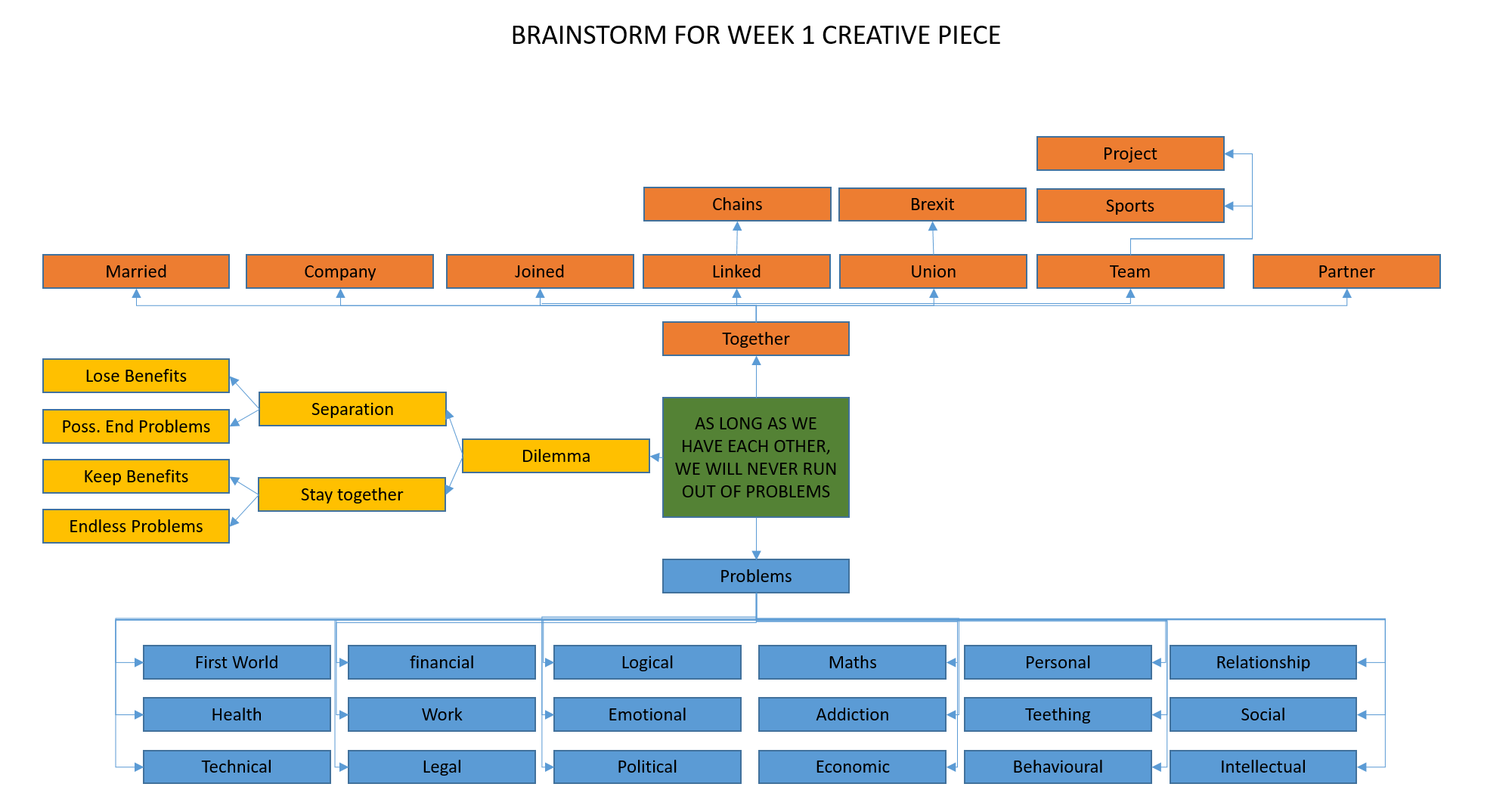
I then went on to randomly and rapidly generate unfiltered word associations for ‘together’ (represented in orange boxes, below) and types of ‘problems’ (represented in blue boxes, below) as two completely separate exercises.
Next, I carefully considered the possible links between the 2 key elements of ‘having each other’ and ‘no end of problems’ (represented in yellow boxes, below). There is a cause and effect relationship between the two, and so I deduced that a dilemma is presented, the options being:
Remain together
Through choice – the perceived benefits of remaining together outweigh the burden of dealing with the consequent persistent problems
By force – the entities are together against their will and gain very little or no benefit, while facing endless problems
Separation
To bring the problems to an end (or at least reduce them) as it is perceived to be of greater benefit to those offered by having each other
To escape the force that is keeping them together against their will and end (or at least reduce) the endless problems.
This is my 1 page
brainstorm:
I then used all of these ideas to think of situations that lend themselves to the scenario. Although the theme offers itself to a whole world of possibilities for games nicely, this is not an area that interests me as a developer and so I dismissed those thoughts immediately. Following this, the most obvious option to me was a dating app. So many people seem hell bent on finding a life partner, in spite of the inevitable problems that manifest as a result (call me cynical!). However, I wasn’t totally sold on this way forward as it’s not something that particularly interests me, and I’m aware that the market is very well, if not overly, catered for, which would make it very difficult to identify a niche that isn’t already satisfied, or present originality to the saturated market.
I also liked the idea of pursuing ‘maths problems’ and ‘logic problems’, as I like numbers and logic puzzles (simple example – Tim is twice the age of Tom, who is 6, so how old will Tim be when Tom is 8?). Coming up with a concept to fit the theme was the next challenge. During this week’s tutorial, we were urged to consider a game concept, if we are not gamers (which I’m not). This led me to thinking about how the gamification of end-of-topic testing for school children might help with their enjoyment of the subject and further their learning.
Apart from my own education, I have no experience of the school system (which I’m sure has moved on considerably since I left in 1988). Had there been a requirement to pursue this concept further, I would have spent time researching the market beforehand. But, for the purposes of the exercise, I have developed my concept based largely on my own assumptions. I did, however, confirm with a primary school Head Teacher friend that children do use tablet devices as part of their maths lessons.
Results:
I decided on the concept of “BREAKOUT!” – a database driven Android & iOS mobile/tablet app that enables the teacher to test student understanding of an area of study in a way that is far more fun and challenging for them than answering questions read out by the teacher, with a pen and paper in silence.
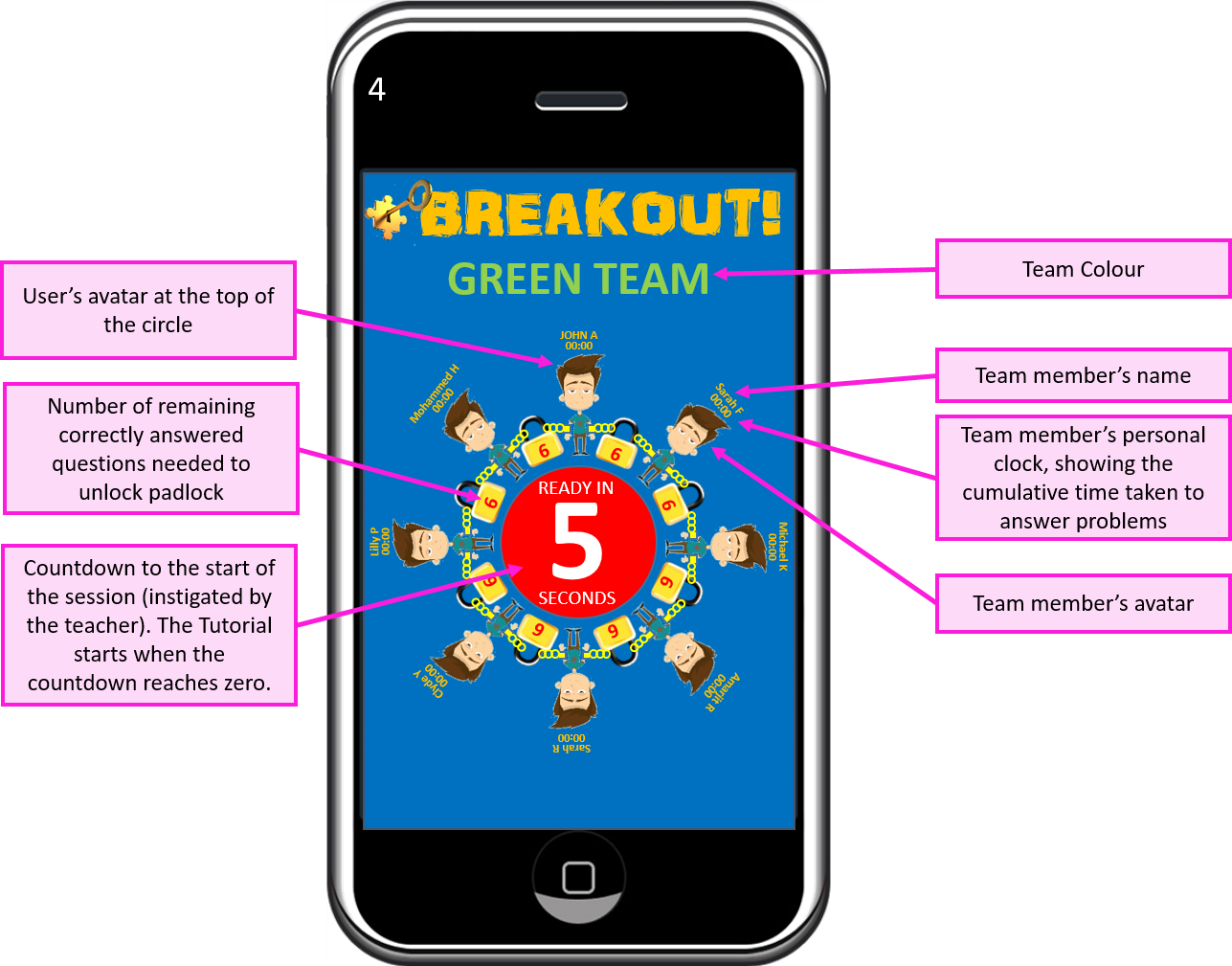
The premise of the game is that (avatars of) the students are chained together in a circle, with padlocks, each with a (teacher determined) number of locks. Whilst they are chained together, they will be presented with ‘no end of problems’. Alternate problems will reward a correct answer with a key to a lock to their left and right. Each time a student correctly solves a problem, they will unlock one of their locks. The aim of the game is for the student to free themselves from the chains, so that they no longer have each other, and put an end to the problems they face.
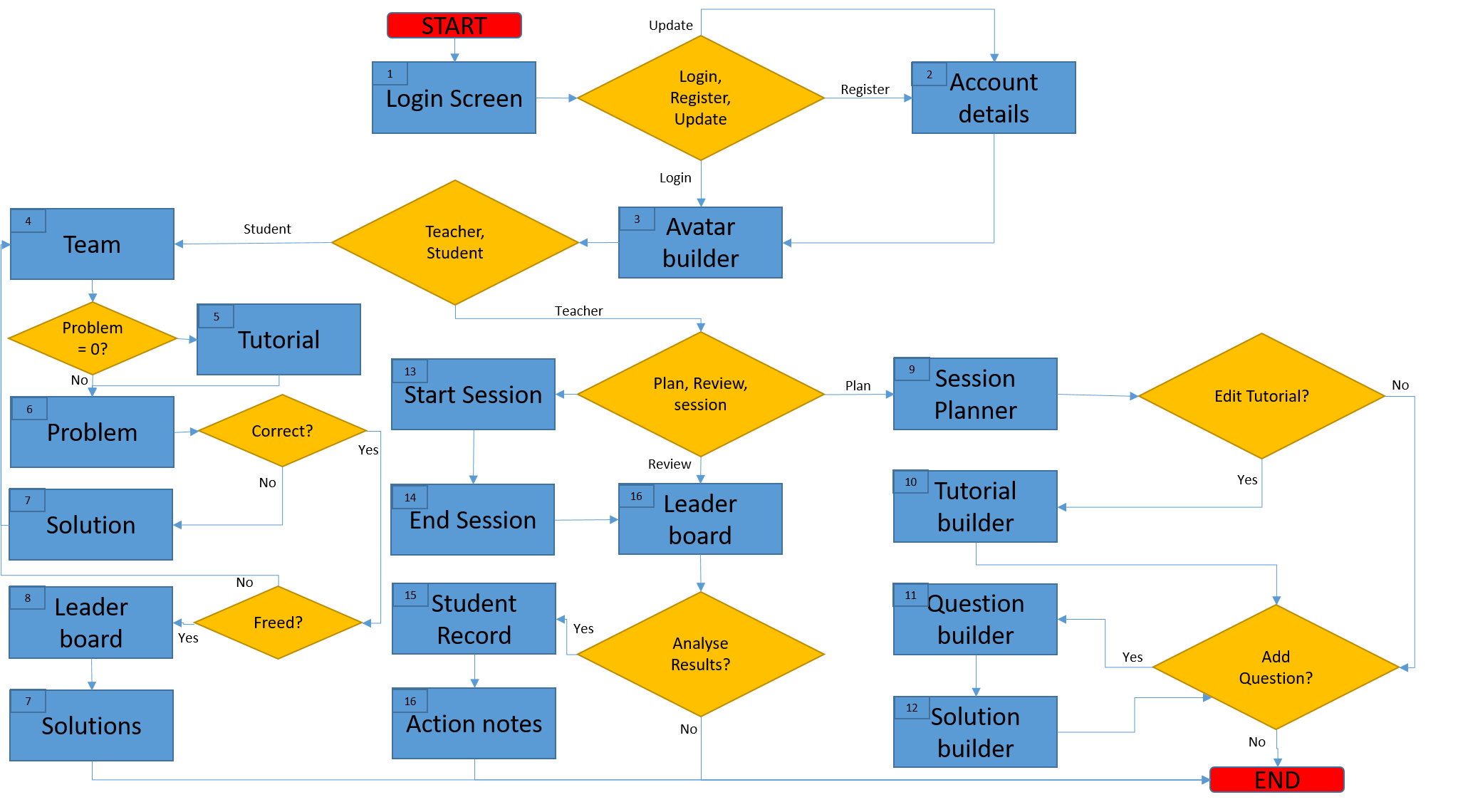
Once I felt that the concept was sufficiently developed in my head, I drew up a process flow diagram to help me to determine the screens that were needed, and how they need to interact. Numbers in the top left corner of each box (mostly) correspond with the screen numbers:
I wasn’t aiming for perfection with this process flow diagram, and I know that there are some shortcomings here, but it gave me direction and served its purpose throughout the process of designing screen content. I actually deviated from the plan on several occasions. As I moved from designing one screen to the next, my thoughts developed, and further consideration as to the practicalities of using the app inspired some alterations to the flow. I didn’t retrospectively update the process flow diagram to reflect those deviations. What you see here is my original plan.
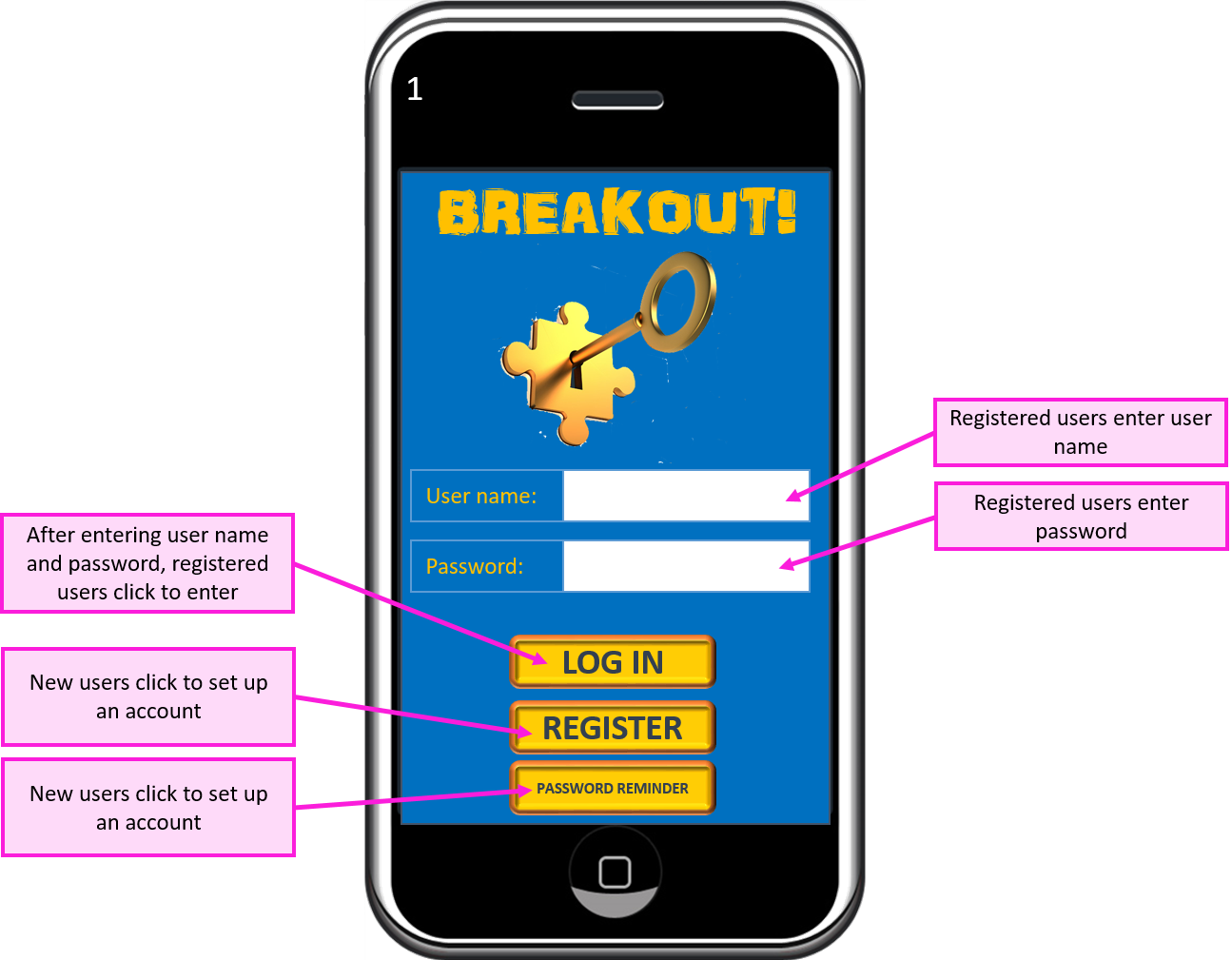
Screen 1 – Log In
The teacher will
have access to student log in details to deal with the issue of students
forgetting passwords.
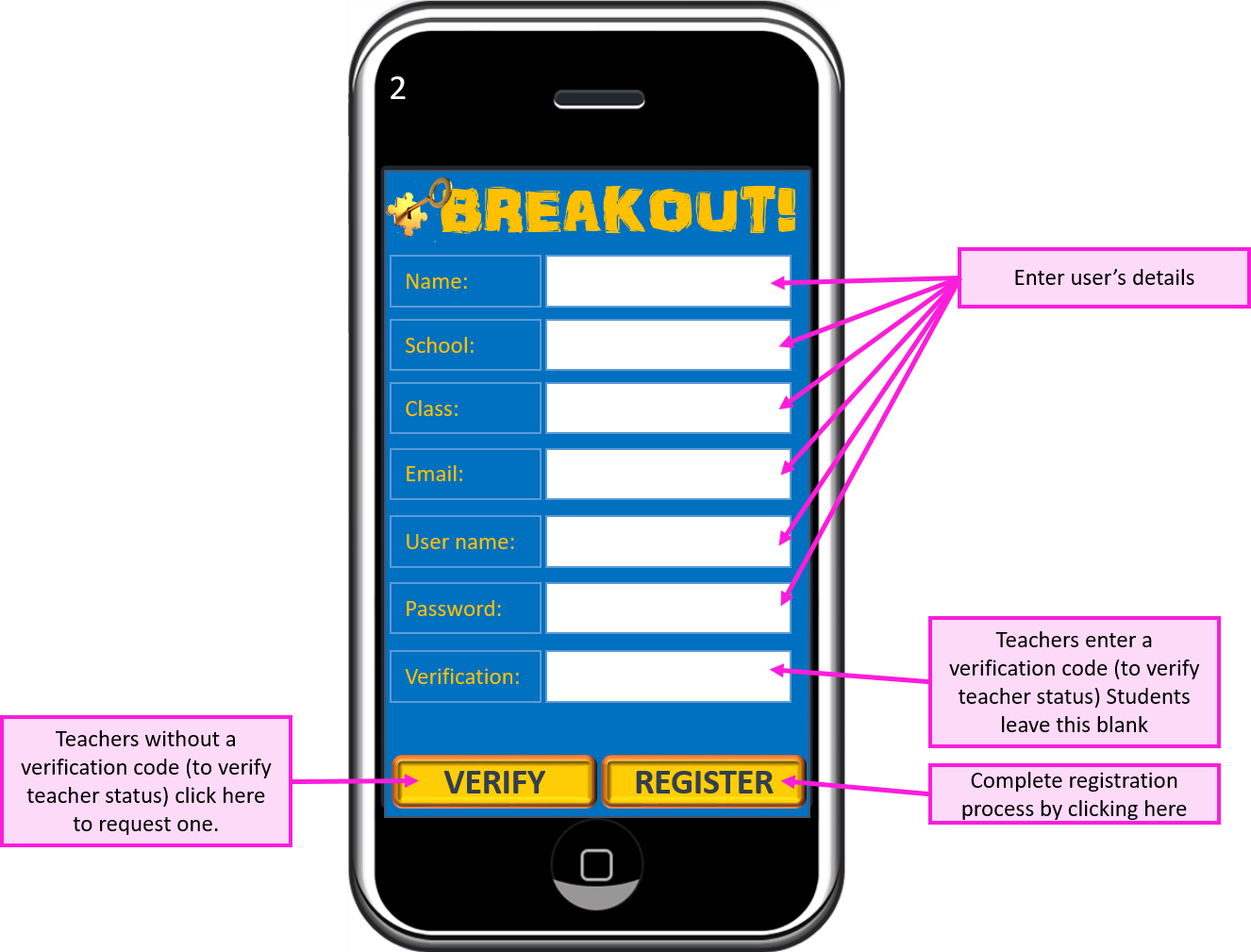
Screen 2 – Account Details
Teachers will be
issued with a verification code to enable them to set up a teacher account.
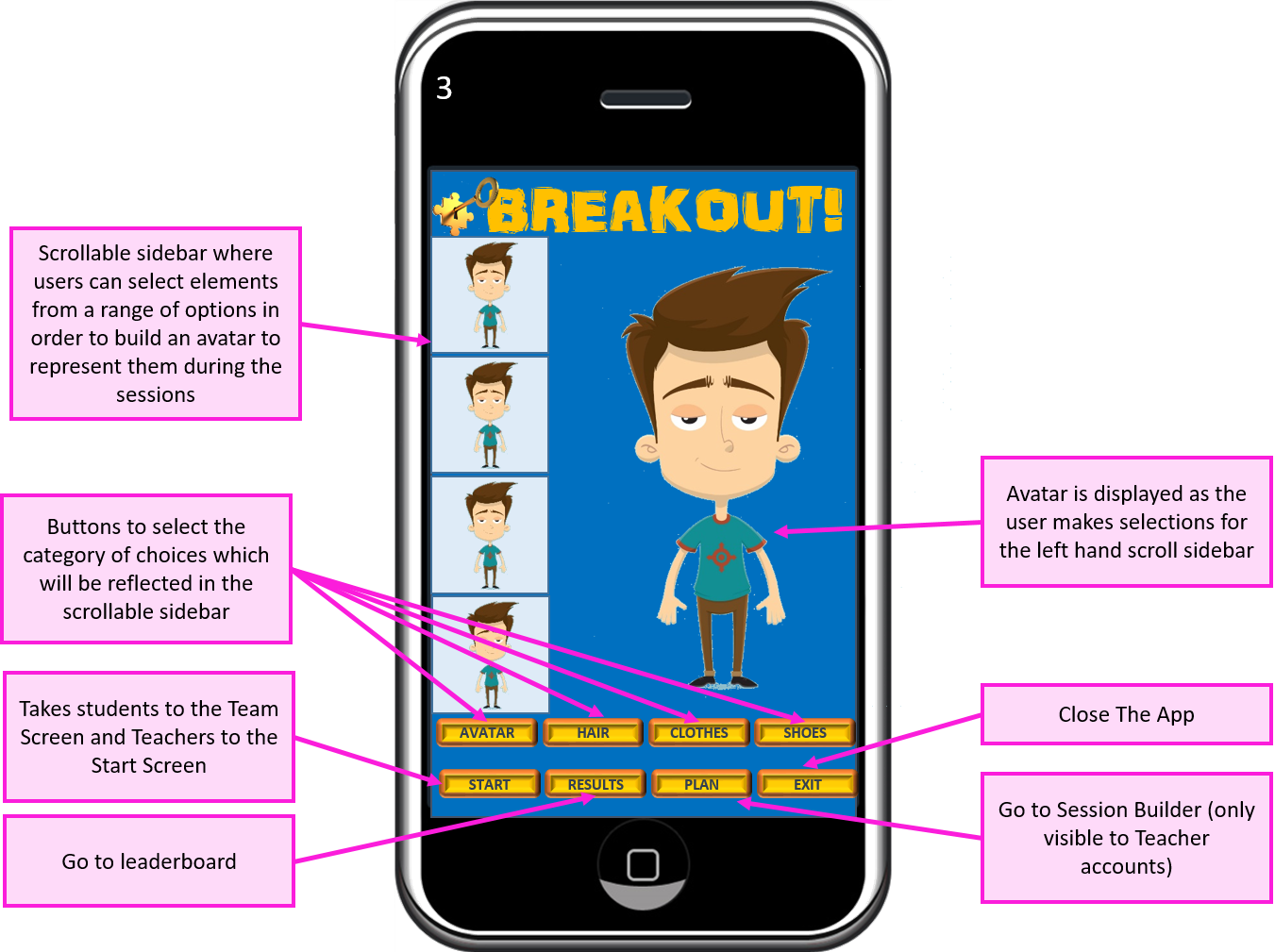
Screen 3 – Avatar Builder
Students
will be able to build and edit an avatar that represents them during the
game. A selection of boy, girl and other
(animals, aliens etc.) choices will be made available. They will be able to go on to further
customise their avatar’s hair style and colour, clothing and shoes, to inspire
fun and creativity.
Screen 4 – Team Screen
From the student
user’s perspective, the team screen acts as the home screen. They will be returned here between problems
where their progress will be updated and they can compare their status with
that of other team members.
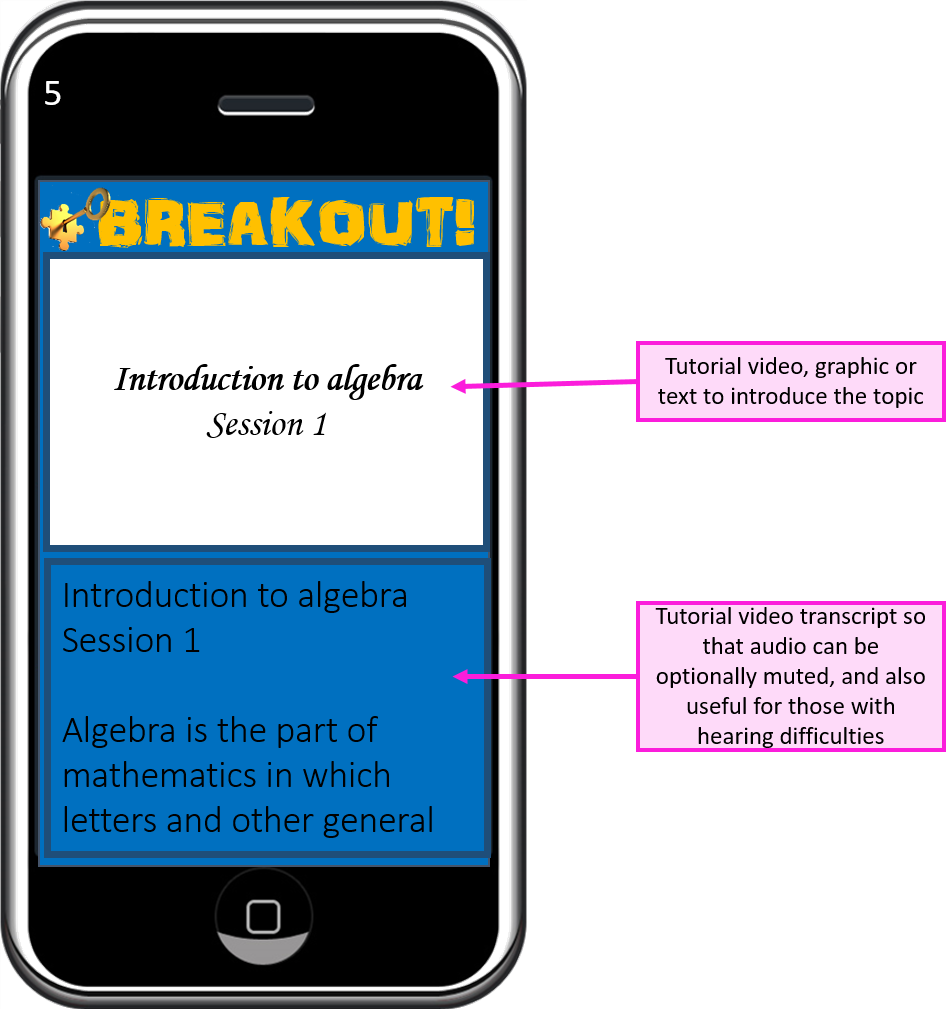
Screen 5 – Tutorial
Teacher can opt to
provide a tutorial to refresh the subject matter for the students. This can consist of a mixture of uploaded
video, graphics and text, and will be shown to the students before the first
problem is presented.
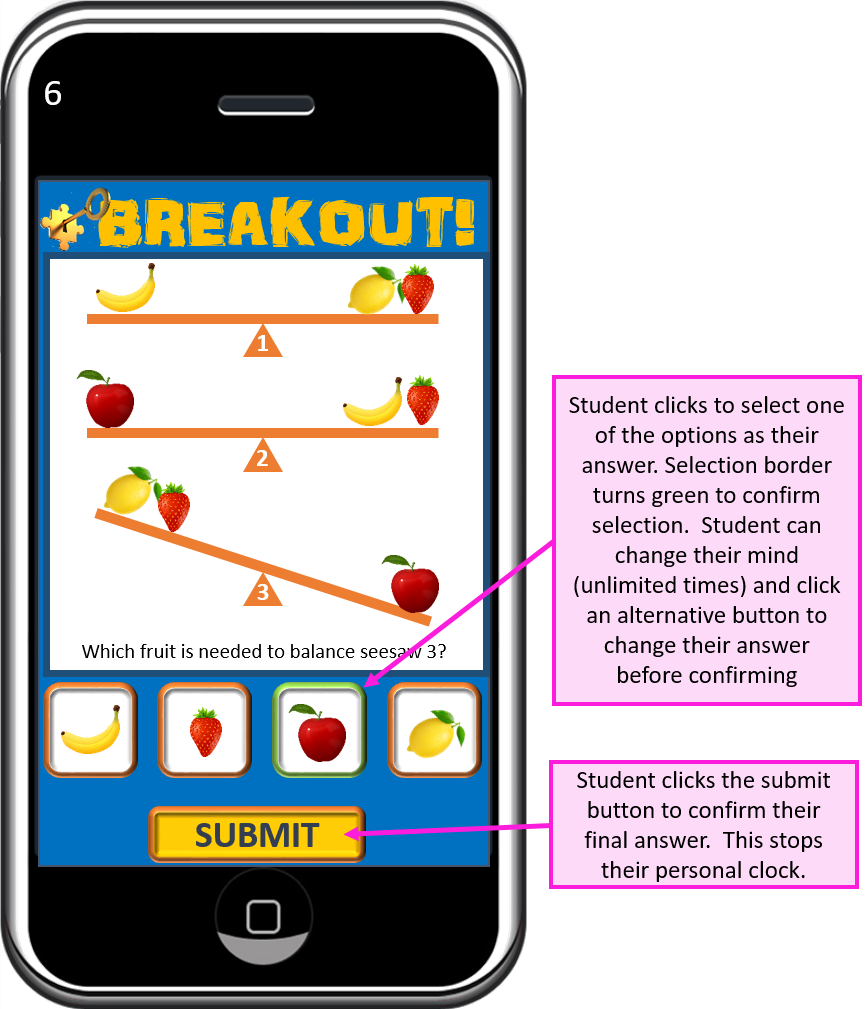
Screen 6 – Problem Screen
The student’s
stopwatch is started when the problem screen is presented, and stopped when
they submit an answer.
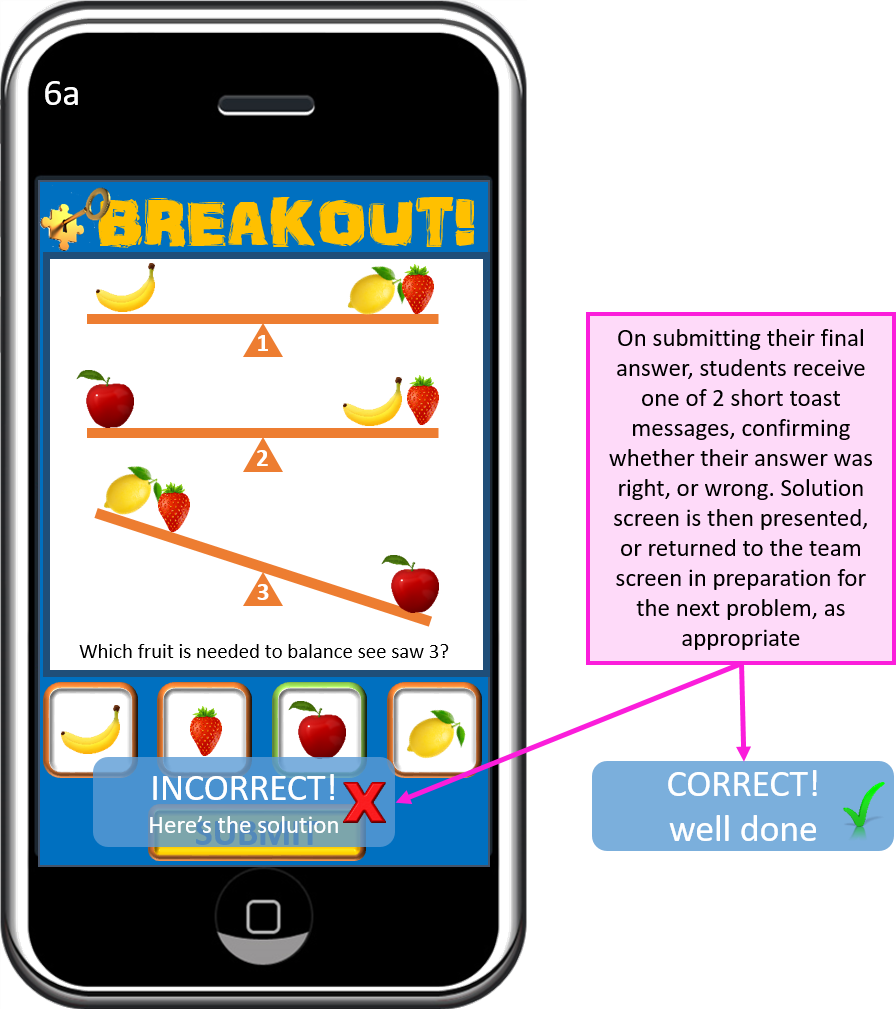
Screen 6a – Marking
The student is
informed whether their answer was correct, or not.
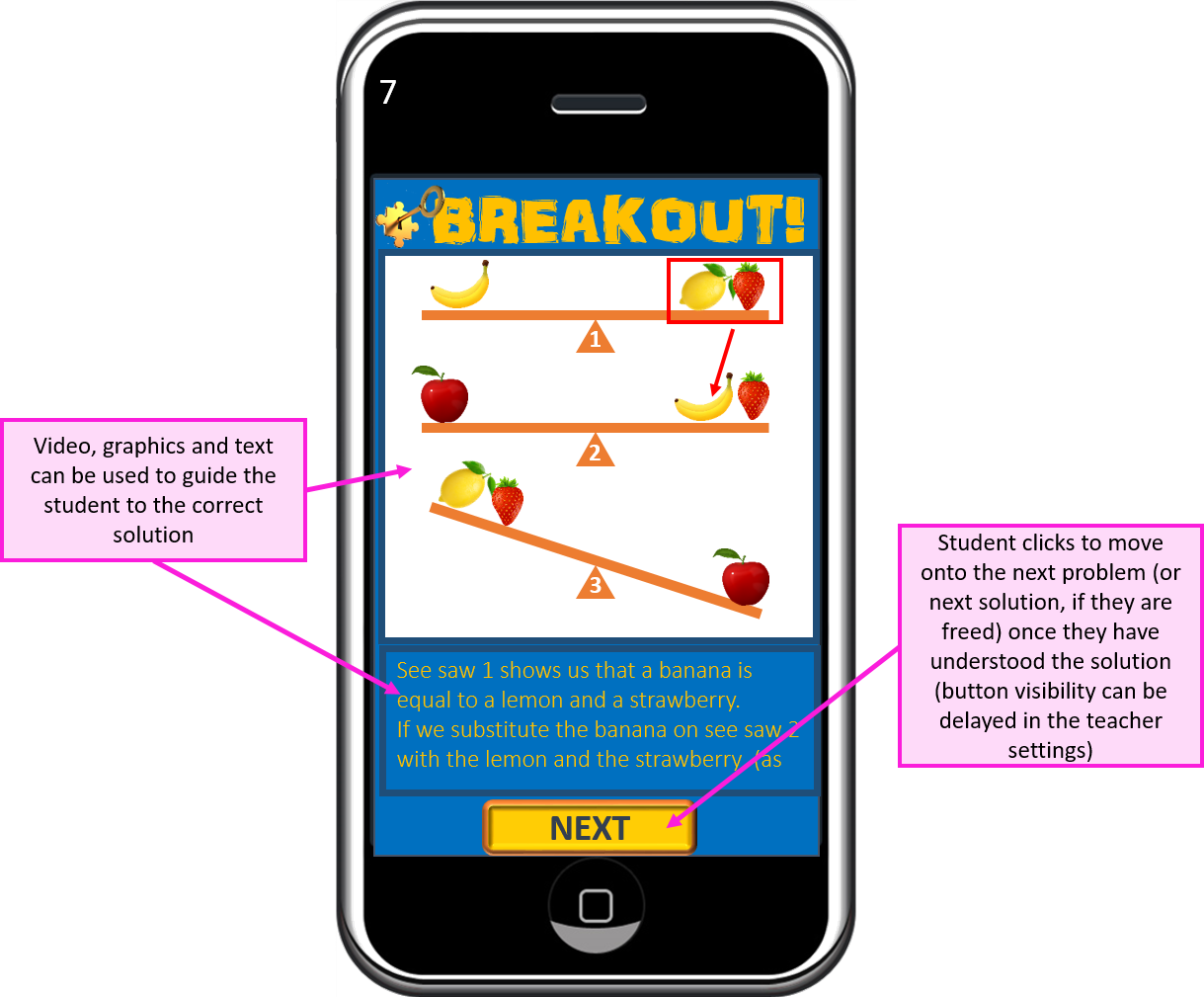
Screen 7 – Solution Screen
If the student has
answered a problem incorrectly, they will be shown the solution immediately
afterwards. The time taken with the
solution will act as a penalty and be added to their score. The teacher has some control over the
magnitude of the penalty when setting the question.
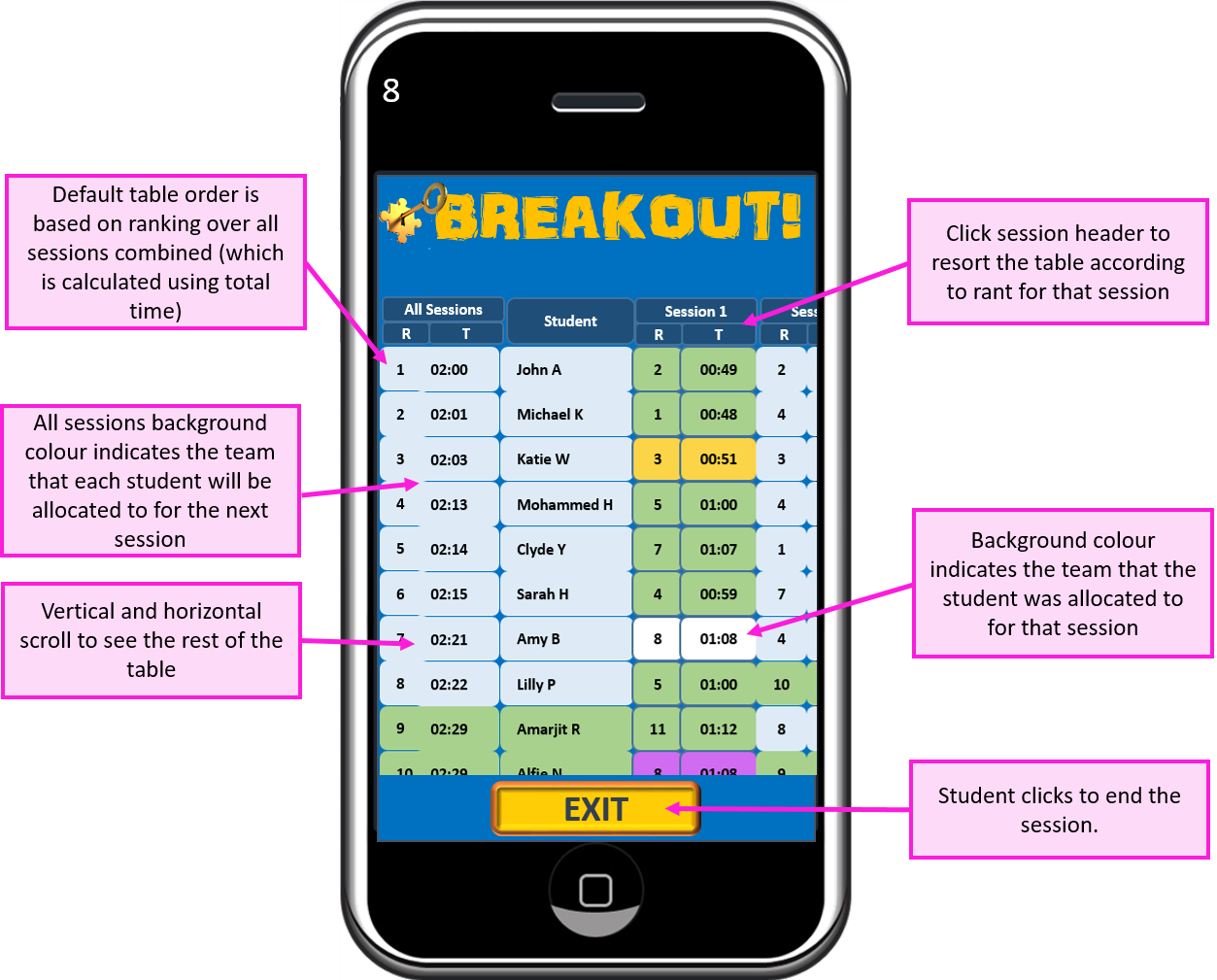
Screen 8 – Leader Board
Students can see how they performed in comparison with other students in their team, and in their class, for each session, and cumulatively over all sessions to date.
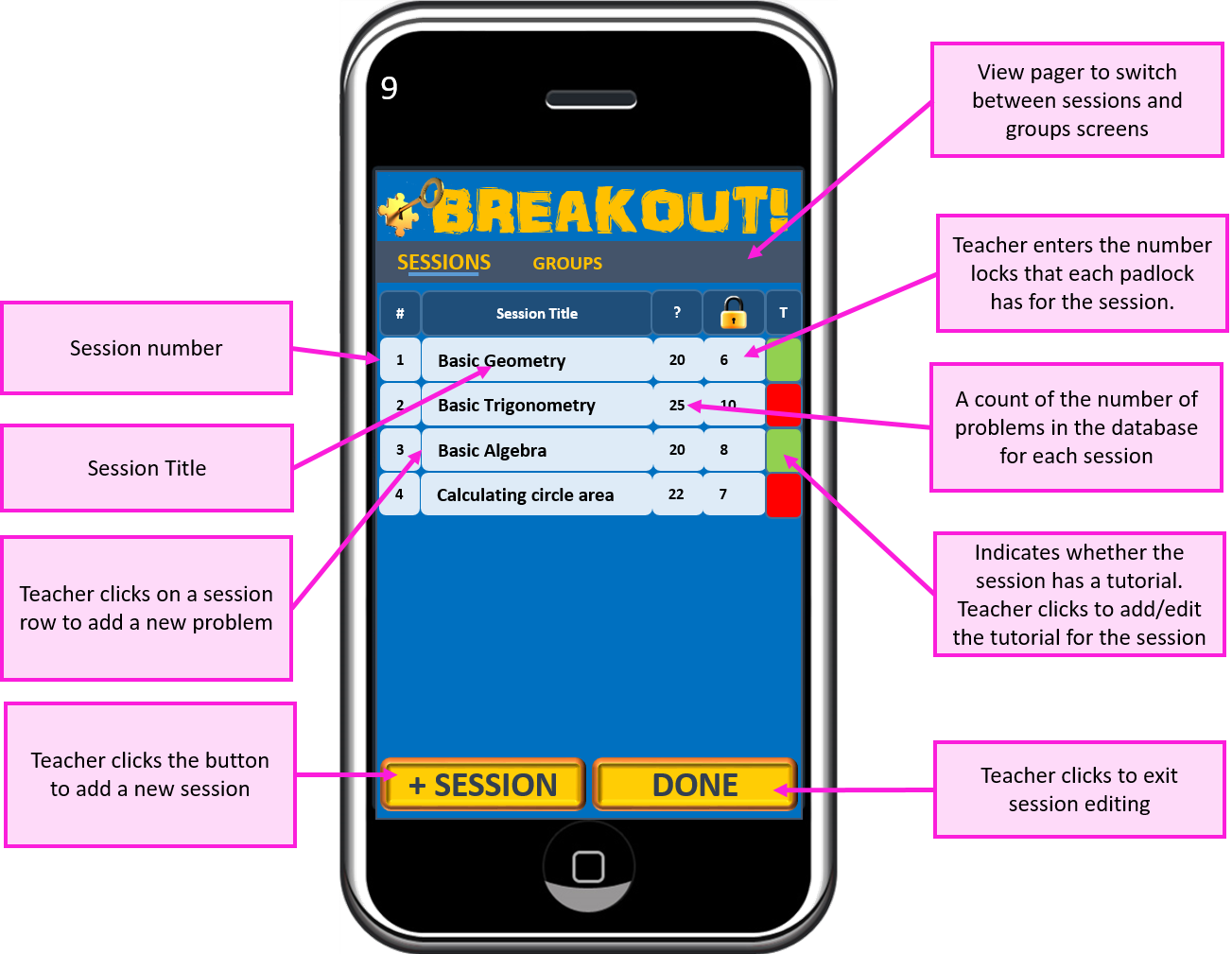
Screen 9 – Session Builder
The teacher can build sessions to cover each of the topics on the syllabus.
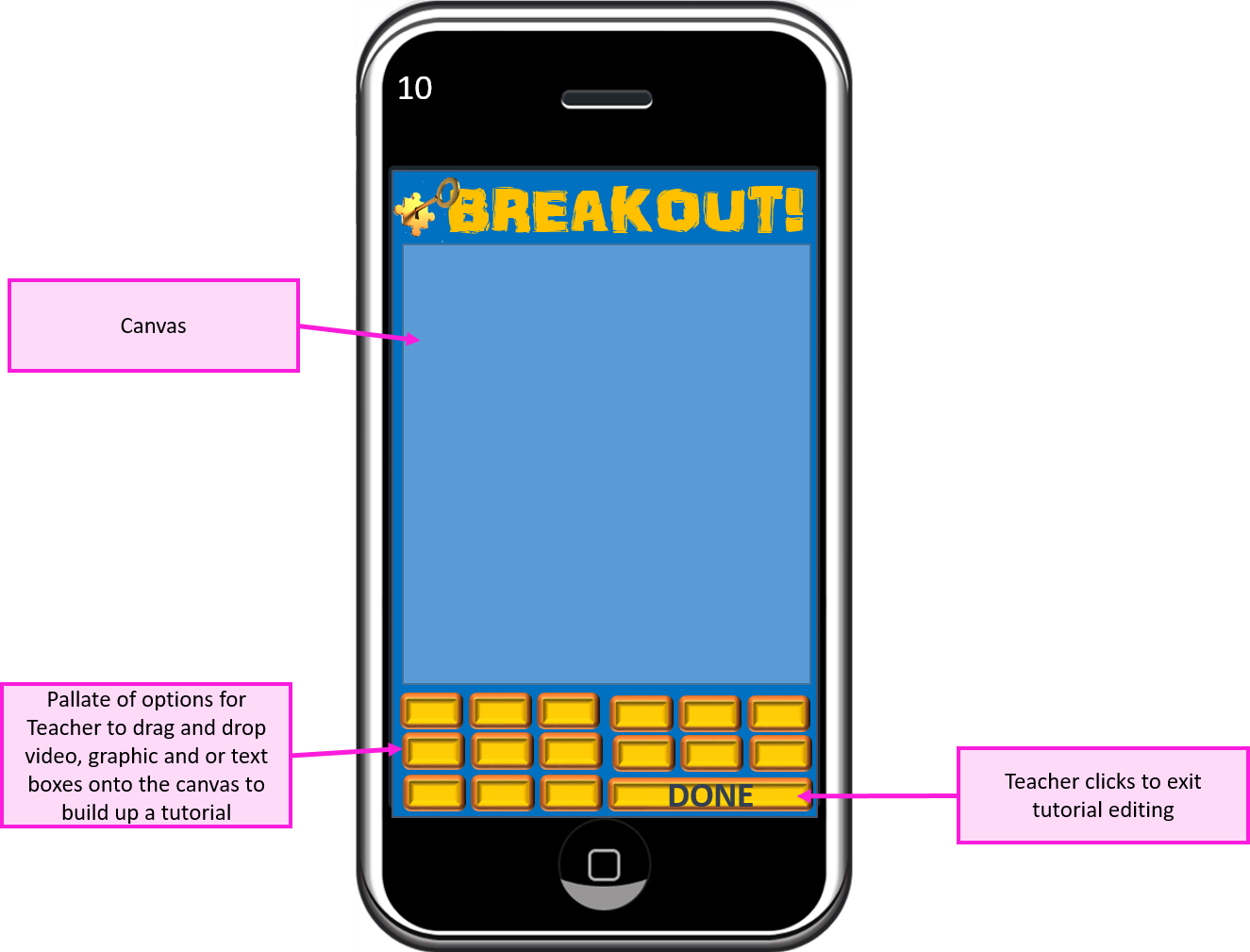
Screen 10 – Tutorial builder
This is where the teacher builds the (optional) tutorial that acts as a brief refresher for students before starting the first problem of the game. I have not gone into too much detail here as far as the controls are concerned, but I anticipate a drag and drop capability, with uploaded video and graphics files.
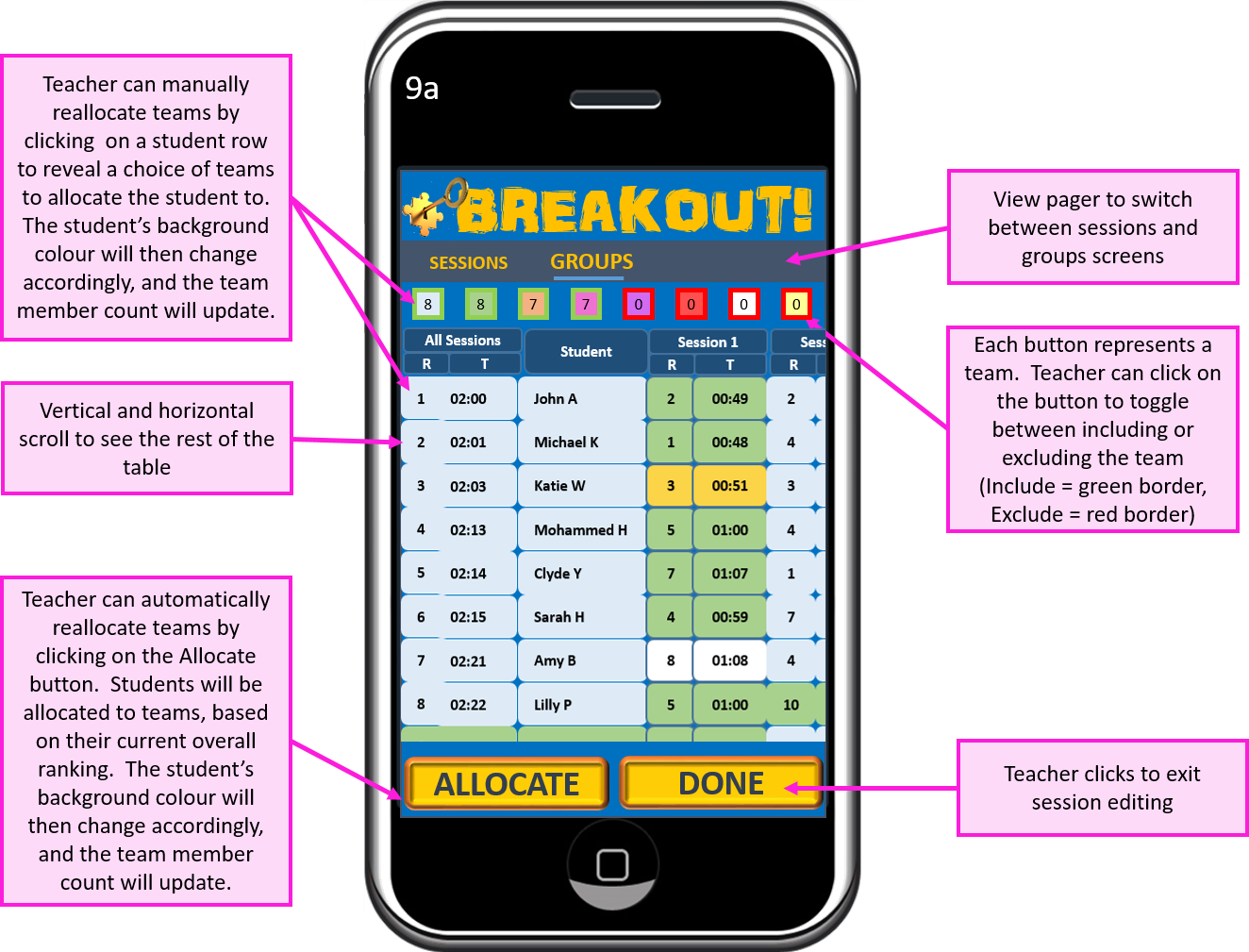
Screen 9a – Problem Builder
The system automatically reports the leader board after each session is complete, and allocates the students to groups according to their overall ranking and an optimised number of groups. The teacher is able to override these allocations if they feel that students could benefit from being in another group.
Screen 11 – Problem List
The teacher is able
to see the full list of problems in the database relating to the session, add
new problems, or edit existing ones.
The teacher needs
to build up a number of problems (all at a similar level of difficulty and
complexity) well beyond the number of locks set on 2 padlocks. This will allow for incorrect answers. Students will be presented with problems in a
random order, so that they are unable to collaborate.
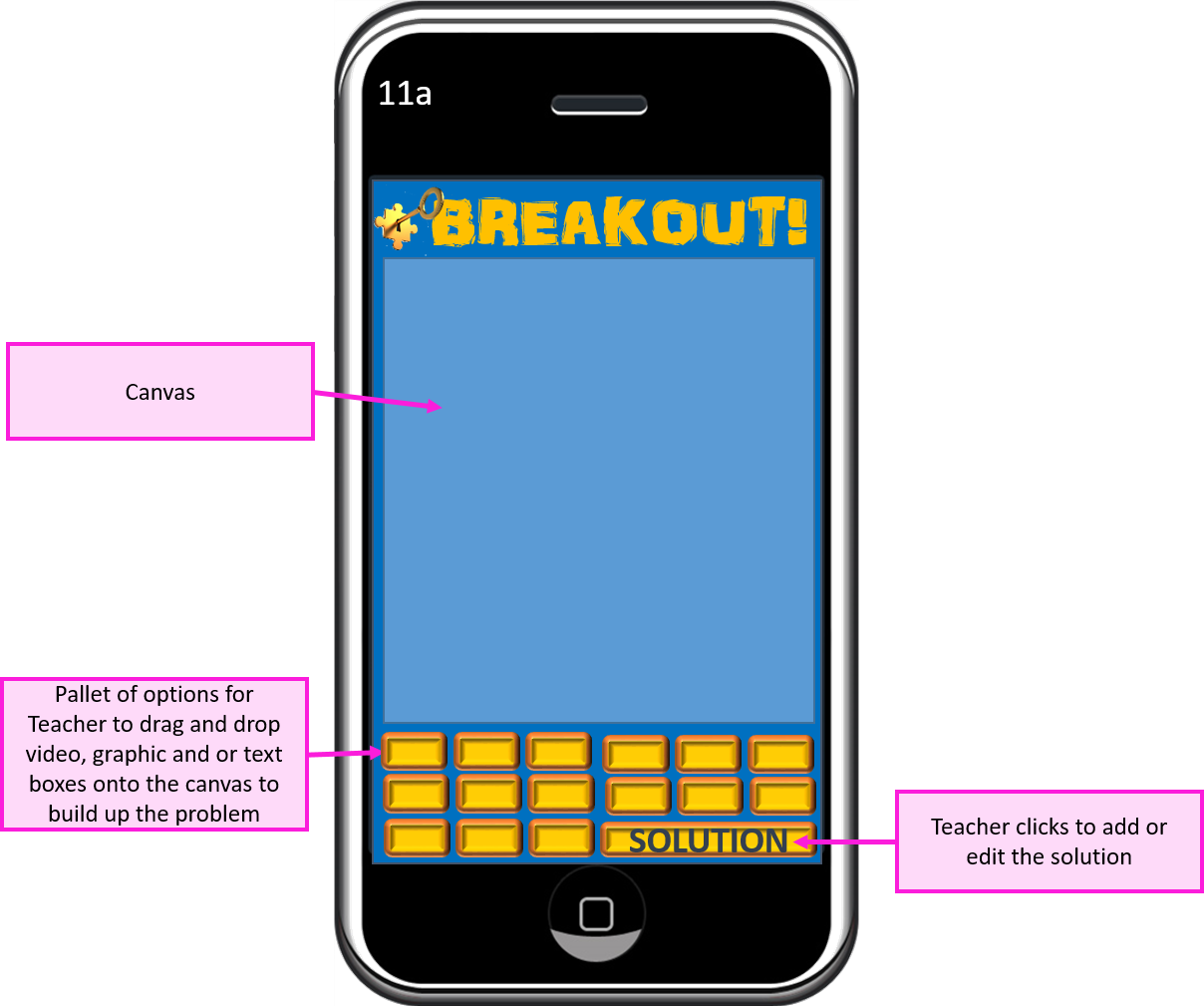
11a – Problem Builder
This
is where the teacher builds the problem screen.
I have not gone into too much detail, as far as the controls are
concerned, but I anticipate a drag and drop capability, with uploaded video and
graphics files
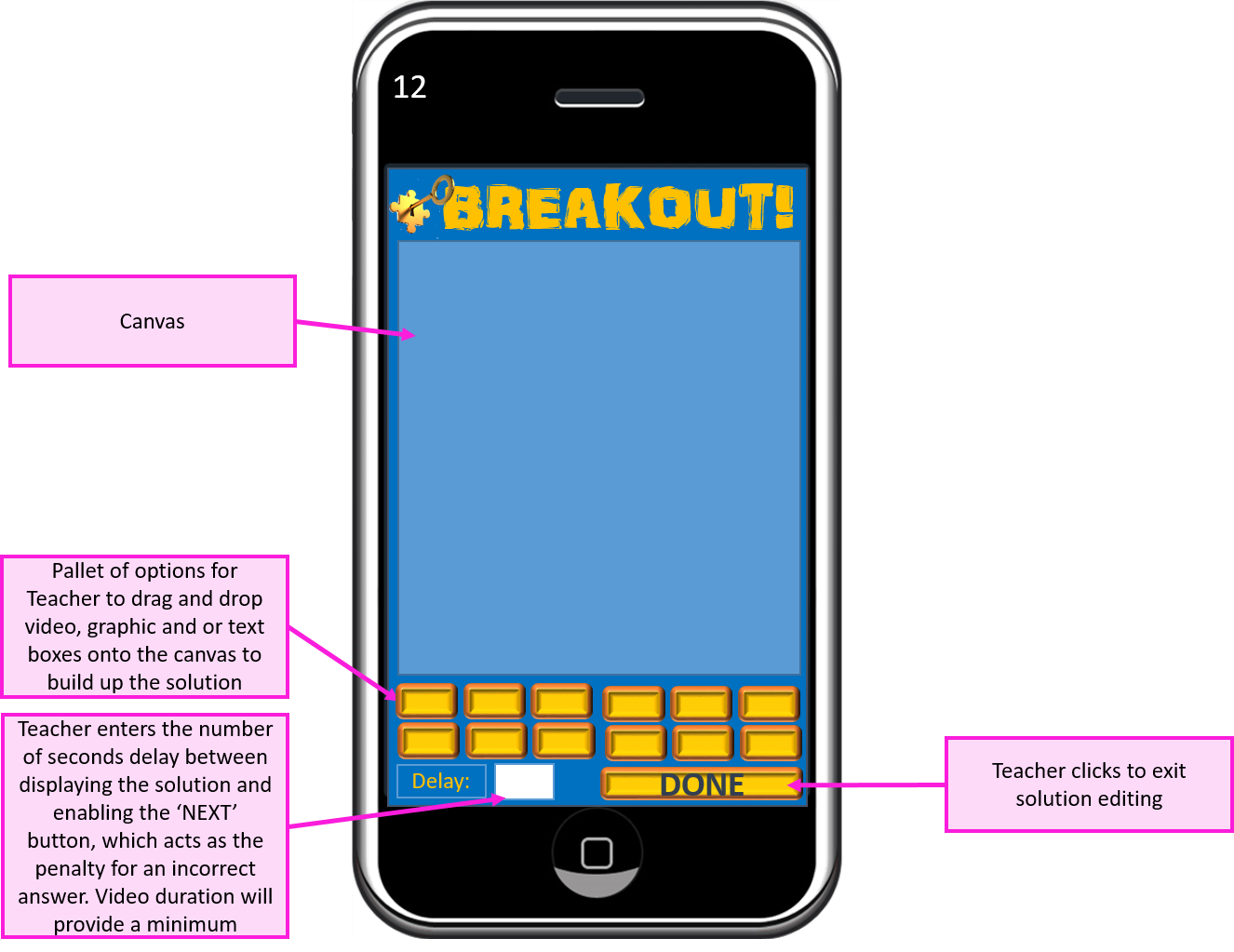
12 – Solution Builder
This
is where the teacher builds the solution screen. I have not gone into too much detail, as far
as the controls are concerned, but I anticipate a drag and drop capability,
with uploaded video and graphics files
13 – Start Session
This is the teacher’s control panel for running a game session. The teacher can see when all the students are ready to commence (and which students aren’t), start the session, and see when students (and full teams) are freed
14 – Teacher Leader Board
This is where the teacher
can analyse results of the session and the overall leader board standings. From here, the teacher can drill down to
analyse the performance of each student.
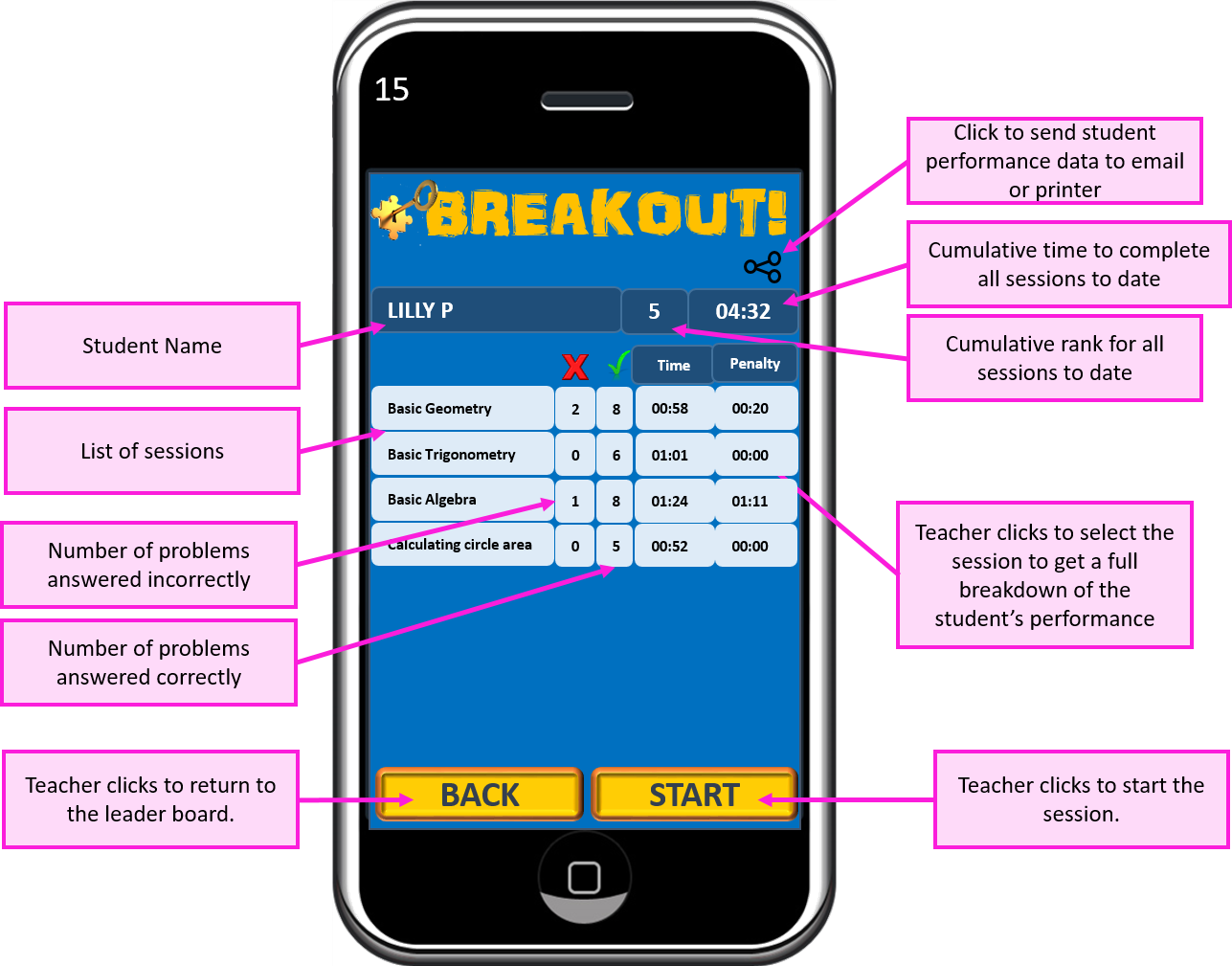
15 – Student Record
This screen shows the student’s overall performance at a session level. The teacher can then click a session row within the table to view the student’s performance for each question within that session.
15a – Detailed Student Record
The teacher can get an insight into how the student performed within each problem that they were presented with.
Credits (in line with graphic usage licence requirements):
Animation could improve the user experience, particularly where younger children are concerned.
The analytical tools could be enhanced to provide more useful reports for teachers, containing charts to aid performance comparison and progress monitoring.
Different games could be added in order to provide some variation for the students.
If I were to pursue this concept any further, I would invest significant time in market research and concept testing before taking it any further. I did do a search for ‘algebra’ on Google Play, which indicated that there might be a gap in the market for the concept. However, to minimise startup risk and maximise the potential for this concept to become a successful product, Among other things, I would need to know a lot more about:
how subject testing is performed in schools now (and the pros and cons of these methods)
what teachers and students (perhaps further segmented by age) want from a new product
what competitive offerings are currently available (I have since been informed of the existence of kahoot.com, which appears to have similarities with my concept)
Education Board approval process
A centralised database (Firebase, for example) would enable results and progress to be compared against other classes and even other schools or countries, providing far greater opportunity for analysis.
The app could be monetized with a structured subscription model. Market research would be required in order to get this right). A payments screen will need to be added.
Teachers could buy and sell the tutorials, individual problems (with solutions) and even entire sessions that they have built. This could be done with subscription credits, or money.
Using Google Analytics would provide useful user data that would contribute to the future evolution of the app.
The concept of the game could be used for testing in subjects other than maths.
The concept lends itself well to a platform situation, where a community of teachers interact to generate value for that community, with network effects providing feedback that will positively impact the product lifecycle.
What went well:
Overall, I was happy with my thought process and how it helped in achieving the results that it did.
I feel that I have achieved a fairly robust first draft concept that fulfils the requirements of the brief and has plenty of scope for further development.
With market research driven refinement, I believe that this concept could possibly have the potential to be moulded into a marketable product.
Lessons learned:
I spent far too long on this exercise. While the ideation phase was completed fairly swiftly, I have probably gone into far too much detail for concept testing purposes.
Building screen mock ups was a very long process. I might have gone into too much detail for each screen, but it is largely down to my choice to use Powerpoint. As I have no manual drawing ability whatsoever, Powerpoint seemed to be a good idea at the time, as I am quite familiar with it and I thought I would save some time over learning a new program for the task.
While Powerpoint is an adequate (if not the best) tool for brainstorming exercises, it is definitely not the best tool for process flow diagramming or for designing screen mock ups, as it is far too fiddly, slow and can get quite messy (particularly where process flow diagrams are concerned). I will spend some time searching out and testing more appropriate tools for these jobs next week.











 My Journey to App Success